SQL connections
Connect your PostgreSQL, MySQL, MariaDB, Oracle, Snowflake, SQL Server and Azure SQL databases, as many as you need, and let the agents you grant one list, describe, query and explain its tables, export a query's rows from PostgreSQL, MySQL, MariaDB, Oracle or Snowflake, and on a read-write connection change its rows within a limit you set
A SQL connection lets an agent read a database your teams already run: list its tables, describe one, run a query, see a query's plan and export a query's rows as a CSV file into the project's workspace. A connection you set to read and write also lets an agent change rows, one statement at a time, within a row limit you set: see Let agents change rows. You add as many connections as you need, each with its own server, login, organizations and limits, so a finance warehouse can be granted to one organization and a CRM database to two others, each under a different login.
Five engines connect today: PostgreSQL, MySQL, which connects MariaDB too (see MySQL and MariaDB), Oracle, Autonomous Database included, Snowflake, which connects by its account rather than a host and signs in with a key pair or External OAuth, and SQL Server, which connects both SQL Server and Azure SQL Database. Oracle and Snowflake have differences of their own, and where SQL Server differs, this page says so.
Before you connect
- A login that can only read. The database's own permissions are the boundary: AskRAI checks every statement and rolls back every read, but what the login is allowed to do is what an agent can ever reach. Create a login with read access to the tables your agents need and nothing more. For a connection that writes, grant it changes to only the tables agents should change. On SQL Server, which has no read-only transaction, the login's grants are what stop a write: make it a member of
db_datareader, or grant itSELECTon each schema agents read, as inGRANT SELECT ON SCHEMA::sales TO [askrai-reader]. - Your firewall allows AskRAI. AskRAI reaches your database from a fixed set of addresses, which the connection form lists under Allow these addresses through your firewall. On Azure SQL, add them to the server's firewall rules. Azure SQL serves a client outside Azure, as AskRAI is, through its gateway on port 1433 under the Proxy connection policy, the default for such a client, so a connection needs port 1433 alone, not the redirect ports 11000 to 11999. AskRAI connects Azure SQL in Azure's public cloud: Azure Government and Azure China (
usgovcloudapi.net,chinacloudapi.cn) are not supported. - TLS with a certificate for the host name. AskRAI never connects without encryption. It verifies the server's certificate against the system's trusted authorities, or against a certificate authority you provide, and checks that the certificate is valid for the host you enter. Azure SQL's certificates come from public authorities, so the system's trusted authorities verify it.
- Strict encryption, on SQL Server. AskRAI connects to SQL Server with strict encryption, where TLS starts before any of the database's own protocol is sent. That needs SQL Server 2022 or later on Windows, SQL Server 2025 on Linux, or Azure SQL Database: SQL Server 2022 on Linux refuses strict encryption, and so does every earlier release.
- A port AskRAI opens. The database must listen on 5432, 1433, 3306, 1521, 1522 or 2484. Snowflake is reached over HTTPS, on 443: see Snowflake.
- A public address. The host must resolve to an address on the public internet. A private network is not reachable.
Add a connection
Open Admin → Tools and choose the Builtin tab.
On the SQL database card, choose Add connection.
Give the connection a Name agents will read, such as Finance DB, a Description, and tick the Organizations that may use it.
Under Database server, choose the Engine, which fills in its default Port, then enter the Host and Database, or for Oracle the Service name, or for Snowflake the Account and Database, and the Warehouse and Role if you need them. For Azure SQL Database, choose SQL Server and enter the server's name as Azure shows it, such as contoso.database.windows.net. Choose how TLS is verified, and paste the CA certificate if you chose a certificate authority you provide.
Under Login, enter the Username and Password of the read-only login. On Snowflake, Sign in with offers Key pair, the user's name and its Private key, or External OAuth client credentials: see Sign in with a key pair and Sign in with External OAuth client credentials. On SQL Server and MySQL, Sign in with offers SQL login or Microsoft Entra service principal, which signs in with its Directory (tenant) ID, Application (client) ID and Client secret, and on MySQL the Username of the MySQL user created for it: see Sign in as a Microsoft Entra service principal. Once the connection exists, how it signs in is fixed.
Under Access, keep Read only, or choose Read and write to let agents change rows. Then list the Schemas the tools show. Leave the list empty to show every schema the login can see.
Adjust the Limits if you need to, and add Notes for agents: what the tables hold and how to read them, such as "Amounts are in cents; the fiscal year starts in April."
Choose Add connection. AskRAI tests the connection as it adds it. When the test passes, the connection is on and its tools are ready to grant. When it fails, the connection is kept, switched off, with the reason under The connection test failed, so you can correct it and test again.
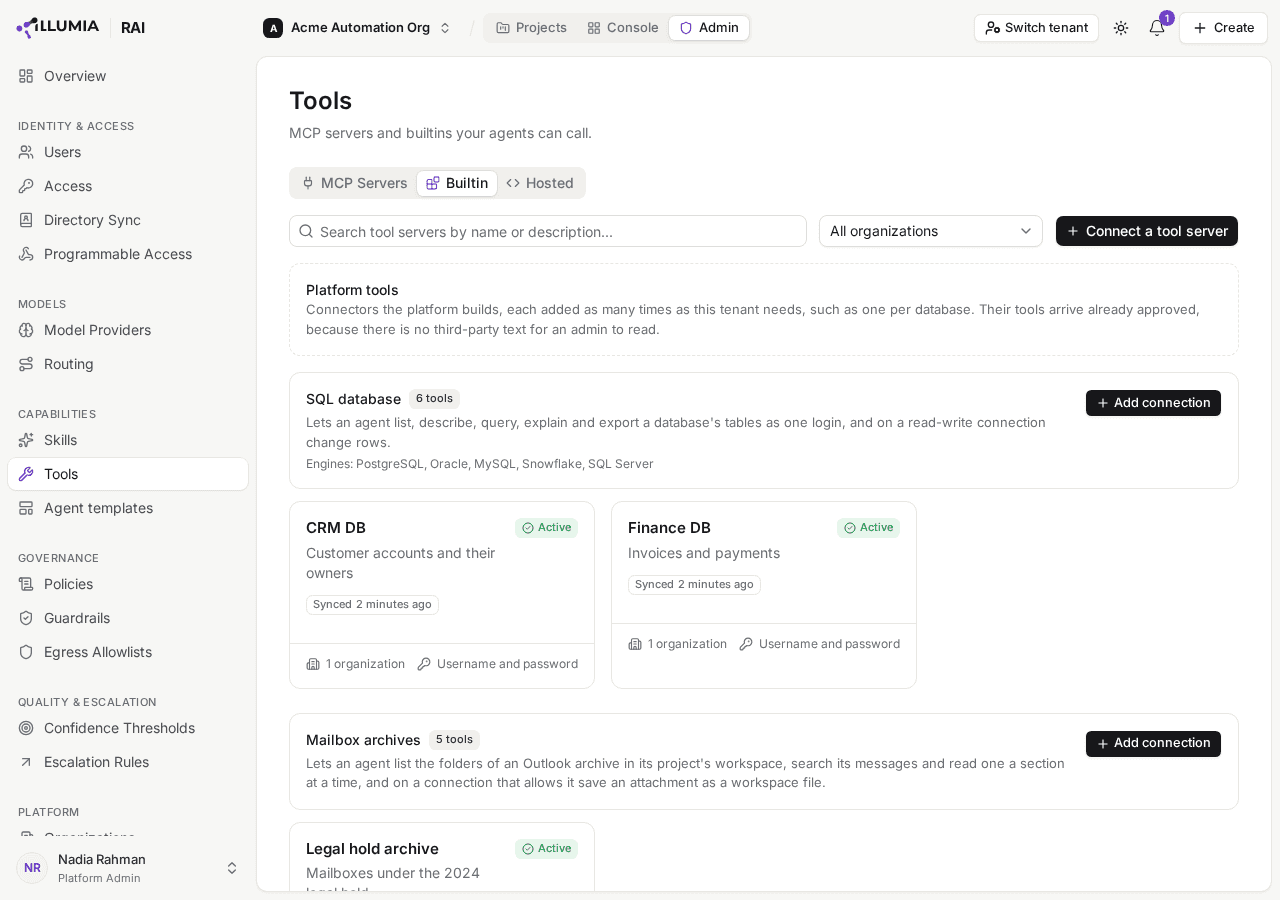
Each kind of platform tool has a card, with the connections you added listed beneath it.
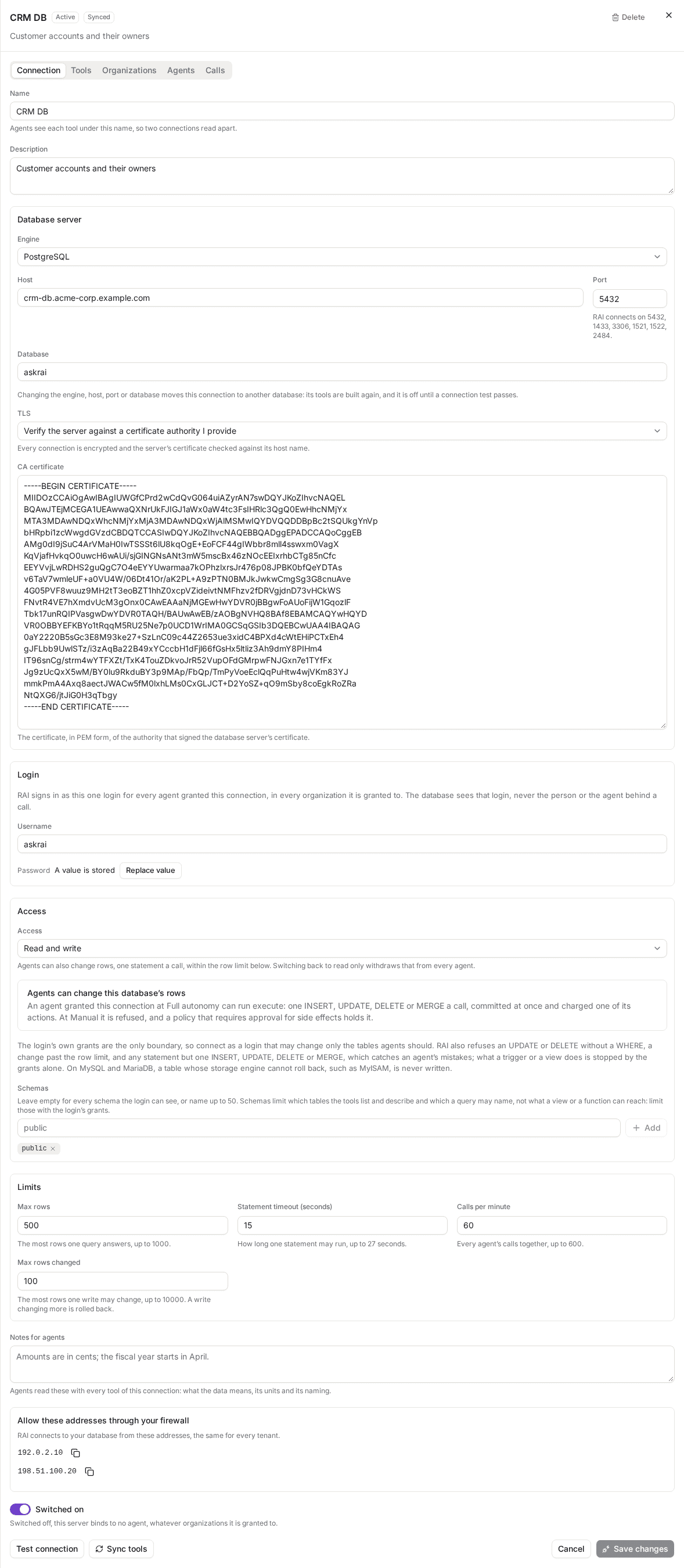
The Connection tab shows each setting and the outbound addresses to allow. Read and write adds Max rows changed.
Sign in as a Microsoft Entra service principal
On SQL Server and MySQL, a connection can sign in as a Microsoft Entra service principal in place of a SQL login, on a server that accepts Entra sign-ins, as Azure SQL and Azure Database for MySQL do. The service principal is an app you register in your own Entra tenant: AskRAI registers no multi-tenant app, so there is nothing of AskRAI's to consent to.
In the Microsoft Entra admin center, register an application in your tenant. From its Overview, copy the Directory (tenant) ID and the Application (client) ID.
Under Certificates & secrets, create a client secret and copy its value.
Signed in as a Microsoft Entra admin of the server, create a user for the app and grant it read access. On SQL Server, in the database the connection reads, the user is named as the app is:
CREATE USER [askrai-reader] FROM EXTERNAL PROVIDER;
ALTER ROLE db_datareader ADD MEMBER [askrai-reader];
On Azure Database for MySQL, you name the user, and identify the app by its Application (client) ID:
CREATE AADUSER 'askrai-reader' IDENTIFIED BY '<application (client) id>';
GRANT SELECT ON finance.* TO 'askrai-reader'@'%';
Under the connection's Login, choose Microsoft Entra service principal under Sign in with, and enter the Directory (tenant) ID, the Application (client) ID and the Client secret. On MySQL, enter the user's name too, as the Username.
As it connects, AskRAI asks Microsoft Entra for a token from https://login.microsoftonline.com/<directory id>/oauth2/v2.0/token, for the scope https://database.windows.net/.default on SQL Server and https://ossrdbms-aad.database.windows.net/.default on MySQL, and hands it to the database: on MySQL as the user's password, which the server asks for over the connection's TLS. AskRAI never writes the token down: it is held in memory, and only until shortly before it expires.
Windows authentication is not available on SQL Server, and on neither engine is signing in as each person with their own Entra account: every call signs in as the connection's one login or service principal.
What agents can do
Every SQL connection offers these tools, all read-only toward your database. export_query is offered on PostgreSQL, MySQL, MariaDB, Oracle and Snowflake connections, and a connection set to Read and write adds execute (see Let agents change rows):
| Tool | What it does |
|---|---|
| list_tables | Lists the tables and views the login can see, inside the connection's schemas, with each one's kind, approximate row count and comment, a page at a time |
| describe_table | Describes a table: its columns with their types, defaults and comments, its primary and foreign keys, and a few sample rows when asked |
| query | Runs one read statement and answers its rows as a table, up to the connection's Max rows |
| explain | Shows the database's estimated plan for a read statement, without running it |
| export_query | Runs one read statement and saves every row it answers as a CSV file in the agent's workspace: see Export a query's rows |
An agent sees each tool under the connection's own name, so one granted Finance DB and CRM DB calls finance-db__query and crm-db__query and never confuses the two. Each tool's description opens with the connection's name and ends with your notes.
A query's answer holds whole rows only. When a result is longer than one answer can carry, the agent is told how many rows it was shown and that more exist, so it can narrow its query. A value longer than 2,000 characters is cut there, and marked as cut.
A query answers at most 100 columns. A wider result is refused before any of its rows is read, and so is one whose column names and types leave no room for a row; either way, the agent is told to select fewer columns.
A value longer than 2,000 characters is cut, with a marker, and a value of a large type is cut by the database server itself, so it never crosses the connection whole. On SQL Server, a result column of a type the server does not cut is refused before any row is read: xml, and CLR types such as geometry and geography, and the agent is told to select it as CAST(column AS nvarchar(max)), which is cut. A json value, which SQL Server describes as text it cuts, is read and cut by AskRAI up to 64 KiB; past that the connection ends, with the same advice.
On SQL Server, two tools need more than read access. explain compiles the statement and runs none of it, which needs the SHOWPLAN permission: GRANT SHOWPLAN TO [askrai-reader]. describe_table shows a column's default only to a login granted VIEW DEFINITION on its schema, as in GRANT VIEW DEFINITION ON SCHEMA::sales TO [askrai-reader].
Export a query's rows
export_query runs a read statement as query does, read-only, and saves every row it answers as a CSV file in the project's workspace, where people open and download it from the Workspace tab. The agent names the file, ending in .csv, and it lands in the agent's default folder, or at the workspace root for an agent that may write anywhere and has no default folder.
- Up to 25 MiB. A larger result ends at a whole row, and the agent is told the statement answered more, so it can export the rest with fewer columns or a narrower
WHERE. On Oracle and Snowflake an export also ends once it has read 50 MiB of the database's answers, which a result reaches before 25 MiB of CSV only when much of it is long values, cut in the file, and on Snowflake binary values, written as their length, or NULLs. On MySQL and MariaDB a row longer than 1 MiB refuses the export, and the agent is told how to cut its long value. An export also ends at a whole row once it has read for the connection's Statement timeout, or if the connection drops, keeping the rows read so far, and the agent is told which. - An agent's write. The file is saved as any file an agent writes is: inside the agent's workspace access, counted against your organization's workspace storage, and spending one of the agent's actions for the beat. At Manual autonomy it is a proposal a person approves before it is saved. When the agent may not write the file, the export does not run; when storage is full, it runs but nothing is saved. Either way the agent is told why.
- Values as a query shows them. A value longer than 2,000 characters is cut, ending in …<cut at 2000 characters>, and a binary value is written as its length, such as <binary 4096 bytes>. The connection's password, private key or client secret, and the access token it signed in with, wherever a value holds one, is written as [redacted]. An empty value and a NULL differ: a NULL is the one empty, unquoted cell.
- Safe to open in a spreadsheet. A value a spreadsheet would run as a formula, one starting with
=,+,-or@(after any spaces), or with a tab or a carriage return, is written with a'in front of it, so it opens as text. A number such as-12.5is left as it is. Outside a spreadsheet, such a value shows the'. - Your output guardrails read the file. A guardrail that blocks or redacts what agents write checks every row, and when it finds what it objects to, the whole export is refused rather than saved altered, and the agent is told to export without that content. A guardrail that only warns is recorded, and the file is saved.
An agent whose output stage holds a blocking LLM judge cannot export. A judge reads what an agent writes with a model, and no model can read an export whole, so every export is refused before it runs. A judge that only warns is not asked, and the beat's trail says so.
A connection added before export_query was available gains it when you choose Sync tools on its Connection tab.
How a read stays read-only
AskRAI protects a read-only connection in layers, and the login's permissions stay the boundary:
- Every statement is checked before it reaches your database. A query runs only if it is exactly one read: a
SELECT, a set operation such asUNION,VALUES, or aWITHquery ending in one. A statement that writes, changes the schema, sets the session or locks rows is refused, and so isSELECT … INTO. On SQL Server, so are a table hint that takes or holds locks (UPDLOCK,HOLDLOCK,XLOCK,TABLOCKand their kin), with or withoutWITH,NEXT VALUE FOR, since a sequence's advance survives a rollback, andFOR BROWSE, and so is a linked server, whatever the schemas:OPENQUERY,OPENROWSET,OPENDATASOURCEand a name of four parts, since what they run on another server no rollback undoes. A statement AskRAI cannot read is refused too, never passed through. - Every read runs in a read-only transaction where the database has one, which the database itself enforces. On Oracle, a sequence's
NEXTVALis refused before it runs, since Oracle advances a sequence even inside a read-only transaction. SQL Server has no read-only transaction, so there the login's permissions are what stop a write. Snowflake has none either, so there the check and the role's grants are what keep a read a read: see The role is the boundary. - Every read is rolled back, whether it succeeds or fails.
- Every read is bounded: by the connection's Statement timeout, by a lock timeout of a quarter of it, so it never waits out its time on someone else's lock, and by Max rows. Oracle's reads never wait on locks. SQL Server has no statement timeout of its own, so there AskRAI ends a statement that runs too long from its side.
What a check cannot see, it does not claim to catch. A function a SELECT calls can try to write, and the read-only transaction and the login's permissions are what stop it. On SQL Server, the login's permissions alone stop it.
Schemas limit what the tools show, not what the login can read. list_tables and describe_table show only the schemas you list, and a query may name only tables in those schemas, never one in another schema or in the database's own catalog (a name starting pg_ on PostgreSQL, the sys and INFORMATION_SCHEMA schemas on SQL Server). On Oracle a query names each table as schema.name, since an unqualified name could reach the login's own schema or a public synonym, and a call to a package such as DBMS_XMLGEN is refused. Oracle also reads c.name as a call to a function of schema c, or of a package, where c is a table joined by JOIN or APPLY that has no column name, so such a table's columns are qualified only in the ON that joins it. Elsewhere, join with a comma and a WHERE condition, marking an outer join with (+) as in WHERE i.id = c.id(+), or name the column alone. A view, or a function the database already holds, built in or your own, can still read beyond them, and some run a query given to them as text. The login's permissions are the boundary: grant it access only to what agents may read.
SQL Server has no search path either, so with schemas listed, a query names each table and table-valued function with its schema, as in sales.orders. Only the names a WITH query defines and the built-in OPENJSON, STRING_SPLIT, GENERATE_SERIES, REGEXP_MATCHES and REGEXP_SPLIT_TO_TABLE go without one, and each of those only where the database's compatibility level makes it built in: 130 for OPENJSON and STRING_SPLIT, 160 for GENERATE_SERIES and 170 for the other two. Below that level, SQL Server would run a function of the same name in the login's default schema or in dbo instead, so a query calling one there is refused. A schema matches only as it is written in the list, case included. A column's method, such as value() on an xml column or STDistance() on a geometry one, is called on the column named with its table's name or alias, as in d.doc.value('(/a)[1]', 'int'), since doc.value(…) alone can also name a function value in a schema doc, which SQL Server calls where the query reads no column doc. In a CROSS APPLY or OUTER APPLY, only nodes() runs, with the columns it returns named after its alias: CROSS APPLY d.doc.nodes('/a') AS x(n). A function that reads the catalog by an object's, a schema's or a database's name, such as OBJECT_DEFINITION, OBJECT_ID, SCHEMA_NAME or DB_NAME, is refused while schemas are listed.
With no schemas listed, a query can also name a table in another database on the same server, as in otherdb.sales.orders, wherever the login can open that database. Grant the login access only to the databases agents may read.
Let agents change rows
Set Access to Read and write, and an agent granted the connection can call execute: one INSERT, UPDATE, DELETE or MERGE on one table, which AskRAI commits and answers with how many rows it changed. Switching the connection back to Read only takes execute away from every agent at once.
Each change is bounded by Max rows changed. A statement runs in a transaction of its own. When it changes more rows than Max rows changed, 100 by default, it is rolled back, nothing changes, and the agent is told how many rows it would have changed. On MySQL and MariaDB a row an UPDATE matched counts whether or not its values changed.
Changing rows is a side effect, and autonomy governs it. An agent at Manual autonomy is refused, as it is for every tool that changes something. At Full autonomy, each call is made at once and spends one of the agent's actions for its run. A policy that requires approval for side effects holds the call. See Autonomy levels.
Every statement is checked before it reaches your database. AskRAI refuses:
- an
UPDATEorDELETEwithout aWHEREclause, or with one that names no column, such asWHERE 1=1, since it picks every row or none. A condition that is always true of a column, such asWHERE id = id, is not caught: Max rows changed is what bounds it; - a
WITHclause,RETURNING,OUTPUT,INTO, a locking clause, an optimizer hint written in a comment (/*+ … */), and any variable or parameter; - more than one table to change: MySQL's multi-table
UPDATEandDELETE, itsDELETE … USING, SQL Server'sDELETE … FROMwith aFROMof its own, and a join, subquery or function in the table's place. A PostgreSQLUPDATE … FROMorDELETE … USING, and an Oracle or SQL ServerUPDATE … FROM, may read other tables; on SQL Server, aDELETEreads them in a subquery of itsWHERE; - any function but a built-in one that only computes a value: text, number, date and time, conditional and conversion functions, and aggregates. A function of your database's own, a sequence's next value,
dblinkand a call to a package are refused; - on Oracle, a column qualified with anything but a table the statement reads, since
pkg.fncalls a package's function. AMERGEjoins its source to its target, and anUPDATE … FROMmay join tables withJOINorAPPLY, where Oracle reads a name the table lacks as a call, so their columns are qualified only in theONthat joins them. Elsewhere name the column alone, renaming a source's column in a subquery where the target has one of its name:MERGE INTO finance.ledger t USING (SELECT id sid, amount new_amount FROM finance.staged) s ON (t.id = s.sid) WHEN MATCHED THEN UPDATE SET amount = new_amount; - on PostgreSQL, what can run a function of your database's own without a call: an
OPERATOR(…), a cast to a type other than the common built-in ones, a name after a table or alias that is not one of its columns, such ast.fn, which PostgreSQL reads asfn(t), and a name after a value in parentheses, such as(t).fn; - on SQL Server,
TOPon the statement itself, any table hint, even one a read may take, such asWITH (NOLOCK)orTABLOCKX, a linked server as for a read, and what can run a type of your database's own without a call: a cast to any type but SQL Server's own,jsonamong those refused since SQL Server 2022 has none, a property after::, a property of a value in parentheses, such as(shape).STX, and a name after a column, such asshape.STX, which reads a property of the column's type. So a column is qualified only with the name or alias of a table the statement reads, as ino.status, never with a schema; - every other statement: schema changes,
GRANT,CALL,EXEC,COPY,TRUNCATE, MySQL'sREPLACEand Oracle'sINSERT ALL.
Every table a statement changes or reads is held to the connection's Schemas, in a subquery, a FROM, a USING or a MERGE's source.
What the checks cannot see. A trigger, a cascading foreign key, a view or a function your database holds can change more than the statement names, and only the login's permissions stop that. On PostgreSQL so can an operator or function your database defines under a built-in one's name, and the type or domain of a column the statement writes to. Those changes are not counted toward the limit. On a table that can roll back, they are rolled back with the statement, but not what a trigger writes to a table that cannot, such as MyISAM, nor what it commits in an Oracle autonomous transaction.
MySQL and MariaDB. A table whose storage engine has no transactions, such as MyISAM, cannot be rolled back past the limit, so AskRAI never writes to one, nor through a view. MySQL's statement timeout covers reads alone, so a long write ends uncommitted when the call's time runs out.
SQL Server and Azure SQL. Max rows changed counts the rows the statement itself changed, never the rows its triggers report, whether or not a trigger sets NOCOUNT. An error a trigger raises stops the change, and nothing commits. A statement still running at the connection's Statement timeout, or waiting past the lock timeout on a row another session holds, ends with nothing changed. A trigger that commits or rolls back the transaction itself ends it before the limit can be held, so the agent is told the change may stand.
Snowflake commits each statement as it runs, so a change past Max rows changed cannot be rolled back. AskRAI reads how many rows the statement changed once it has run, and when that is past the limit, the agent is told so and the change stands. Connect as a role that may change only what agents should, and set Max rows changed as a warning rather than a guarantee. INSERT OVERWRITE, which empties a table first, is refused.
Writes are available on every engine: PostgreSQL, MySQL, MariaDB, Oracle, Snowflake, SQL Server and Azure SQL.
Test a connection
Choose Test connection on the Connection tab at any time. A passing test shows the server's version and confirms that a read-only transaction opened, for example Connected to PostgreSQL 18.6 · read-only transaction opened, Connected to Oracle 23.26.3.0.0 · read-only transaction opened, or Connected to MySQL 11.8.9-MariaDB-ubu2404 · read-only transaction opened for a MariaDB server. SQL Server has no read-only transaction, so its test shows the server's version and edition, and that reads are rolled back, for example Connected to SQL Server 17.0.1000.7 Enterprise Edition (64-bit) · reads run in a transaction that is rolled back.
Change a connection
Edit any field on the Connection tab and choose Save changes. AskRAI tests the connection again as it saves.
- Renaming. A new name alone saves without a test, and the tools' descriptions open with it at once. Their names, such as
finance-db__query, keep the name the connection was added with. - Moving to another database. Changing the engine, host, port, database or service name, or a Snowflake connection's account, moves the connection, so AskRAI asks you to confirm. Its tools are rebuilt, and it stays off until a test against the new database passes.
- The password, a Snowflake connection's private key, or a client's Client secret, is never shown. A connection with one stored says A value is stored; choose Replace value to set a new one.
- Someone else saved first. If another administrator changed the connection after you opened it, your save is not applied. Choose Reload to see their change, then make yours again.
Oracle
An Oracle connection names the database's Service name in place of a database, and connects over TCPS, Oracle's TLS:
- The listener serves TCPS. Port 2484 is the default, and 1521 or 1522 work when the listener serves TCPS on them. A listener that serves only plain TCP refuses the connection.
- No redirect. AskRAI connects only to the address it checked, so it does not follow a listener that redirects the connection to another one. Connect to the listener of the instance that serves the service: for Real Application Clusters, a node's listener rather than SCAN, and not through shared server dispatchers.
- A login. Oracle connections sign in with a username and password. Signing in with an OCI IAM or Microsoft Entra service principal is not available yet, and neither is a wallet's mutual TLS.
- Schemas in capitals. Name each schema as Oracle's catalog does, in capitals unless it was created quoted, such as
FINANCE. - Explain writes a plan, and keeps none. Oracle writes an estimated plan into your session's own plan table, so
explainruns in a transaction that is rolled back rather than a read-only one. The statement itself is never run.
Autonomous Database. Connect with its TLS connection string, not mutual TLS: in the database's Network settings, turn off Require mutual TLS (mTLS) authentication and add the addresses on the Connection tab to its access control list. Enter the host and port of the connection string (port 1522) and its service name, such as abc123_finance_high.adb.oraclecloud.com. AskRAI has not yet been confirmed against a live Autonomous Database. If Test connection says the listener redirected the connection, run an Oracle Connection Manager that your database trusts, reachable from AskRAI over TCPS, and connect to it instead.
MySQL and MariaDB
Choose MySQL as the engine for either: MariaDB speaks MySQL's protocol, and AskRAI tells them apart when it connects. AskRAI needs MySQL 8.0 or later, or MariaDB 10.2 or later. It connects on 3306 by default.
- A schema is a database. On MySQL and MariaDB the Schemas you list are databases. A table named without its database is read in the connection's Database, so when you list schemas, list that database among them. Leave the list empty to show every database the login can see, apart from the server's own:
information_schema,mysql,performance_schemaandsys. - Names are read as written. MySQL does not fold a name to lower case, so
Ordersandordersare two tables on a server that tells case apart, and an agent names a database exactly as it is listed. - The checks are MySQL's. Statements are read as MySQL writes them, backquoted names included. An optimizer hint (
/*+ … */) is refused, since one can lift the statement timeout, and so areSELECT … INTO,FOR UPDATEandLOCK IN SHARE MODE. A comment is dropped before the statement runs, so a versioned comment (/*! … */) never reaches your server. - Each read is a read-only transaction (
START TRANSACTION READ ONLY), held to the statement timeout and a lock timeout, and never committed. - A login, or on Azure a Microsoft Entra service principal. An Azure Database for MySQL connection can sign in as an app you register in Entra, as the MySQL user created for it: see Sign in as a Microsoft Entra service principal.
- No person context. MySQL and MariaDB hold no session value a row-level policy can read, so every call reads as the connection's login.
Snowflake
A Snowflake connection names your Account in place of a host and port, and signs in as a Snowflake user with a key pair, or with a token your own identity provider issues through Snowflake's External OAuth, rather than a password. AskRAI reaches your account through Snowflake's SQL API over HTTPS, on port 443, from the addresses the form lists under Allow these addresses through your firewall, so a Snowflake network policy can allow them.
- Account is your account identifier: the part of your Snowflake address before
.snowflakecomputing.com, such asmyorg-myaccount. - Database is required.
- Warehouse and Role are optional. Without them, the user's default warehouse and role apply, or with External OAuth the role the token names.
- Names as Snowflake stores them. The database, warehouse, role and each schema are matched exactly as Snowflake stores them: in capitals, such as
FINANCE, unless the object was created in double quotes.
Sign in with a key pair
Enter the Snowflake user's name as the Username, and its Private key in place of a password: an unencrypted RSA private key of 2048 to 4096 bits in PKCS#8 form, a .p8 file.
Generate an unencrypted private key in PKCS#8 form:
openssl genrsa 2048 | openssl pkcs8 -topk8 -inform PEM -out rsa_key.p8 -nocryptWrite out its public key:
openssl rsa -in rsa_key.p8 -pubout -out rsa_key.pubIn Snowflake, as an administrator who may alter the user, set the public key on it. Paste the body of rsa_key.pub, without its -----BEGIN PUBLIC KEY----- and -----END PUBLIC KEY----- lines:
ALTER USER <user> SET RSA_PUBLIC_KEY='<key body>';Paste the whole of rsa_key.p8 into Private key, or load the file there.
An encrypted private key is refused when you save the connection, and AskRAI says why. The key is stored encrypted and never shown again. To rotate it, set a new public key on the user and replace the private key here: setting it as RSA_PUBLIC_KEY_2 keeps the old key working until you do.
Sign in with External OAuth client credentials
A Snowflake connection can sign in with an access token from your own identity provider, such as Okta or Microsoft Entra ID, which a Snowflake External OAuth security integration trusts. The client application is yours: AskRAI registers none.
In your identity provider, create a client application that may use the client credentials grant, and copy its client ID, a client secret and the provider's token endpoint. Have its tokens name the Snowflake role the connection runs as: on Okta, a scope such as session:role:ASKRAI_READER, which you list under Scopes; on Microsoft Entra ID, an app role of that value on your Snowflake resource's application, granted to the client, whose /.default scope you list instead.
In Snowflake, create an External OAuth security integration for that provider, mapping the token's subject to a Snowflake user, and grant that user the role: see The role is the boundary.
Under the connection's Login, choose External OAuth client credentials under Sign in with, and enter the Token endpoint, an https:// address, the Client ID, the Scopes, separated by spaces, and the Client secret.
As it connects, AskRAI posts the client ID and secret to the token endpoint in a Basic authentication header, asks for the scopes you listed, and sends the token to Snowflake as its OAuth bearer. AskRAI never writes the token down: it is held in memory, and only until shortly before it expires.
Snowflake runs the session in the role the token names. Leave the connection's Role empty, or name that same role: Snowflake refuses a request naming another, and the connection's test fails. Signing in as each person with their own Snowflake OAuth is not available: every call signs in as the connection's one client.
The role is the boundary
Snowflake has no read-only transaction, so the role the connection runs as is what keeps it read-only. AskRAI's own check still lets only one read statement through: a SELECT, a set operation such as UNION, or a WITH query ending in one. It refuses a statement that writes or changes the schema, a SHOW written by an agent, CALL and EXECUTE IMMEDIATE, a SYSTEM$ function and a sequence's NEXTVAL.
Connect as a user whose role is granted only what agents may read: USAGE on the warehouse, the database and the schemas, and SELECT on the tables. For example:
CREATE ROLE askrai_reader;
GRANT USAGE ON WAREHOUSE analytics_wh TO ROLE askrai_reader;
GRANT USAGE ON DATABASE finance TO ROLE askrai_reader;
GRANT USAGE ON SCHEMA finance.reporting TO ROLE askrai_reader;
GRANT SELECT ON ALL TABLES IN SCHEMA finance.reporting TO ROLE askrai_reader;
GRANT ROLE askrai_reader TO USER askrai;
Name that role as the connection's Role, or make it the user's default.
Schemas on Snowflake
With schemas listed, a query names each table as schema.table, with one of those schemas; only the names a WITH query defines for itself go without one. Snowflake would otherwise look an unqualified name up in its search path, which includes PUBLIC. A query is refused too when it names a database in front of a schema (db.schema.table), reads a stage (@stage), or reads INFORMATION_SCHEMA or the shared SNOWFLAKE database. A table function of another schema, or one Snowflake looks up by name, is refused, and so is GET_DDL(); FLATTEN reads only what the query already reads. IDENTIFIER() and TO_QUERY() are refused whatever the schemas: they name an object or a query by text.
With no schemas listed, the role decides what an agent sees.
Answers from Snowflake
The five read tools work as on every engine. describe_table shows the primary and foreign keys a table declares, which Snowflake records but does not enforce, and explain shows Snowflake's estimated plan without running the statement.
- The statement timeout is applied by Snowflake itself.
- A row or an answer too large to read is refused, and the agent is told to select fewer or narrower columns, or to cut long values with
LEFT(). - Warehouse time each query uses is billed by Snowflake to your account.
- No person context. Snowflake holds no session value a row access policy can read, so every call reads as the connection's user.
Grant a connection to an agent
A SQL connection is granted like any other tool server: on the agent's Skills & Tools tab, by a Member of a project in an organization the connection is granted to. See Team. An egress allowlist in force for the agent admits a SQL connection by its host, and a Snowflake connection by its account's, such as myorg-myaccount.snowflakecomputing.com.
An agent template that grants a SQL connection finds it by the connection's name in each organization. When it holds no name that matches, it uses the organization's SQL connection if the organization is granted exactly one, and otherwise lists the grant as one it could not apply.
See a connection's calls
The Calls tab lists the calls agents made to the connection from the projects shared with you, with a Summary of each, such as SELECT · 3 rows · 12 ms or SELECT · export · 50000 rows · 840 ms. A summary never holds your data. An export refused before it ran, because the agent may not save its file, shows as Refused: the agent may not save that file there.
On your database's side, AskRAI's sessions sign in as the connection's login and are named askrai-agent, so a DBA tells them apart: PostgreSQL's application name, MySQL's program_name connection attribute, Oracle's module, SQL Server's program name.
Limit how often agents call a database
Calls per minute caps the calls every agent together makes to the connection in each minute, counted from the start of the minute (UTC), so a busy team cannot overload your database. Once the minute's calls are used up, further calls are refused without reaching the database, and the agent is told the connection is busy and to try again later. The Calls tab shows each one as Refused: the connection’s calls per minute were used up or could not be counted: when a call cannot be counted, it is refused too rather than risk going past your limit. A refused call does not count against the agent's own call budget.
Field reference
| Field | What it holds |
|---|---|
| Engine | The database engine: PostgreSQL, MySQL for a MySQL or MariaDB server, Oracle, Snowflake, or SQL Server for SQL Server and Azure SQL Database |
| Host | The database server's host name or IP address, alone: no scheme, port or path. For Azure SQL Database, the server's name, such as contoso.database.windows.net. Not on Snowflake |
| Port | The port the server listens on: 5432, 1433, 3306, 1521, 1522 or 2484. Choosing the engine fills in its default: 5432 for PostgreSQL, 3306 for MySQL, 2484 for Oracle, 1433 for SQL Server. Not on Snowflake |
| Database | The database to connect to. Not on Oracle |
| Service name | Oracle only: the service the listener registers for the database |
| Account | Snowflake only: the account identifier, the part of its address before .snowflakecomputing.com |
| Warehouse | Snowflake only, optional: the warehouse queries run on. Empty uses the user's default |
| Role | Snowflake only, optional: the role queries run as. Empty uses the user's default, or with External OAuth the role the token names |
| TLS | Verify the server against the system's trusted authorities, or against a certificate authority you provide |
| CA certificate | The certificate authority's certificate, in PEM form, when you provide one |
| Sign in with | On SQL Server and MySQL, SQL login or Microsoft Entra service principal. On Snowflake, Key pair or External OAuth client credentials. Fixed once the connection exists |
| Username, Password, Private key | The login. On Snowflake, the user's name and its unencrypted PKCS#8 Private key in place of a password |
| Directory (tenant) ID, Application (client) ID, Client secret | On SQL Server and MySQL, a Microsoft Entra service principal in place of a password: the IDs from the app's overview in Entra, and a client secret created for it. On MySQL, the Username is the MySQL user created for the app |
| Token endpoint, Client ID, Scopes, Client secret | On Snowflake, External OAuth client credentials in place of a user and key: your identity provider's token endpoint, the client's ID and secret, and the scopes its token is asked for, separated by spaces |
| Access | Read only, or Read and write to let agents change rows with execute |
| Schemas | The schemas the tools show and a query may name. Empty shows every schema the login sees. On MySQL and MariaDB, databases, the connection's own among them. On Snowflake, named as Snowflake stores them: in capitals unless created in double quotes |
| Max rows | The most rows a query answers, up to 1,000. 200 by default |
| Max rows changed | Read and write only: the most rows one statement may change, up to 10,000. 100 by default. A statement changing more is rolled back, except on Snowflake |
| Statement timeout | How long a statement may run, in seconds, up to 27. 15 by default |
| Calls per minute | How many calls agents may make to the connection each minute, up to 600. 60 by default |
| Notes for agents | What agents should know to read the data, up to 2,000 characters |
Troubleshooting
| What you see | What it means |
|---|---|
| the database refused the login | The username or password is wrong, or the login may not connect. On SQL Server, the login may also be refused the database you entered. On MySQL with a Microsoft Entra service principal, the Username must be the user created for this app's Application (client) ID. Check them, then Test connection |
| the login may not connect to this database | On SQL Server, the login signed in but may not open the database: it has no user there, or no database of that name exists. Check the Database, and that the login has a user in it |
| Could not get an access token | Microsoft Entra refused the service principal's sign-in. Check the Directory (tenant) ID, the Application (client) ID and the Client secret, and that the secret has not expired |
| the server's TLS certificate is not for this host | The certificate does not name the host you entered. Enter the name the certificate was issued for |
| the server's TLS certificate did not verify | AskRAI does not trust the certificate, and says why in parentheses. unable to get local issuer certificate or a self-signed certificate: it was not issued by an authority AskRAI trusts. Choose to verify against a certificate authority you provide, and paste its certificate, not the server's own. certificate has expired: renew it |
| the database redirected the connection to another server | On Azure SQL, the server's connection policy is Redirect, which sends a connection to another address that AskRAI does not follow. Set the policy to Default or Proxy, which carries a connection from outside Azure through the gateway on port 1433 |
| The connection ended before the database had answered | The database sent more than AskRAI reads of one answer or one value, or something it does not read, or the call ran out of time, and AskRAI closed the connection rather than hold it. Select fewer or narrower columns. On SQL Server, select a json column as CAST(column AS nvarchar(max)), which the server cuts |
| the TLS handshake with the server failed: strict encryption needs SQL Server 2022 or later, or Azure SQL | The server cannot take strict encryption: it is older than SQL Server 2022, or it is SQL Server 2022 on Linux. Connect to SQL Server 2022 or later on Windows, SQL Server 2025 on Linux, or Azure SQL Database |
| the server does not offer TLS | The database does not accept encrypted connections. Turn TLS on at the server |
| the connection timed out or the server refused the connection | AskRAI could not reach the server. Check the host and port, and that your firewall allows the addresses on the Connection tab |
| the host resolves to a non-public address | The host leads to a private network, which AskRAI does not reach |
| the database does not exist | No database of that name is on the server |
| the listener does not know this service name | Oracle's listener has no service of that name. Check the service name, such as the one in your connection string |
| the listener redirected the connection to another listener | Oracle's listener sent the connection on, which AskRAI does not follow. Connect to the listener of the instance itself: see Oracle |
| the TLS handshake with the server failed | The port is not served over TLS. On Oracle, connect to the listener's TCPS port |
| the database account is locked or the login's password has expired | The login cannot sign in until a database administrator unlocks it or sets a new password |
| the database's answer was larger than one call may read | A statement's answer went past what one call reads. Select fewer or narrower columns, or fewer rows |
| the login may not connect to this database | The login holds no access to the database, or, on MySQL and MariaDB, no database of that name is on the server |
| On MySQL and MariaDB a schema is a database … | The schemas you listed leave out the connection's database. Add it to the list |
| An agent's export did not run | The agent may not write to the workspace or to its default folder, the folder is gone, the file name does not end in .csv, or a blocking LLM judge reads what it writes. The agent is told which |
| An agent's export ran but saved no file | An output guardrail blocks or redacts something in the rows, or your organization's workspace storage is full. The agent is told which |
| Port … isn't open from RAI | The port is not one AskRAI connects on. Use one of 5432, 1433, 3306, 1521, 1522 or 2484 |
| RAI's outbound addresses are not configured in this environment | This environment has no fixed outbound address to allow |
| An agent's query is refused with Only a read runs here | The statement was not a single read. The agent is told why, and can rewrite it |
| An agent's change is refused with The statement changed … rows, more than this connection's limit | The statement would have changed more rows than Max rows changed, so it was rolled back. Raise the limit, or let the agent change the rows in smaller calls |
| An agent's change is refused with That table's storage engine (MyISAM) has no transactions | On MySQL and MariaDB, AskRAI writes only to a table that can be rolled back. Convert the table to InnoDB, or keep the connection read-only |
| … connections can't write yet | The engine does not support Read and write yet. Keep the connection read-only |
Related
Tools
Connect MCP tool servers or write hosted ones, review every tool a server offers before an agent can call it, and grant servers to the organizations that may use them
Mailboxes
Let the agents you grant a mailbox connection list the folders of an Outlook archive uploaded to their project, search its messages by sender, recipient, subject, date and attachments, read a message one section at a time, and save its attachments into the workspace when you allow it