Programmable Access
Issue and govern API, CLI, and MCP credentials that let external applications and AI agents query AskRAI with enterprise-grade controls
Programmable Access turns AskRAI into a governed data plane for your external applications, CLI workflows, and AI agents. From this page you decide which machine-to-machine interfaces are enabled for your tenant, set tenant-wide rate limits, and issue named credentials that authenticate every request with full audit context.
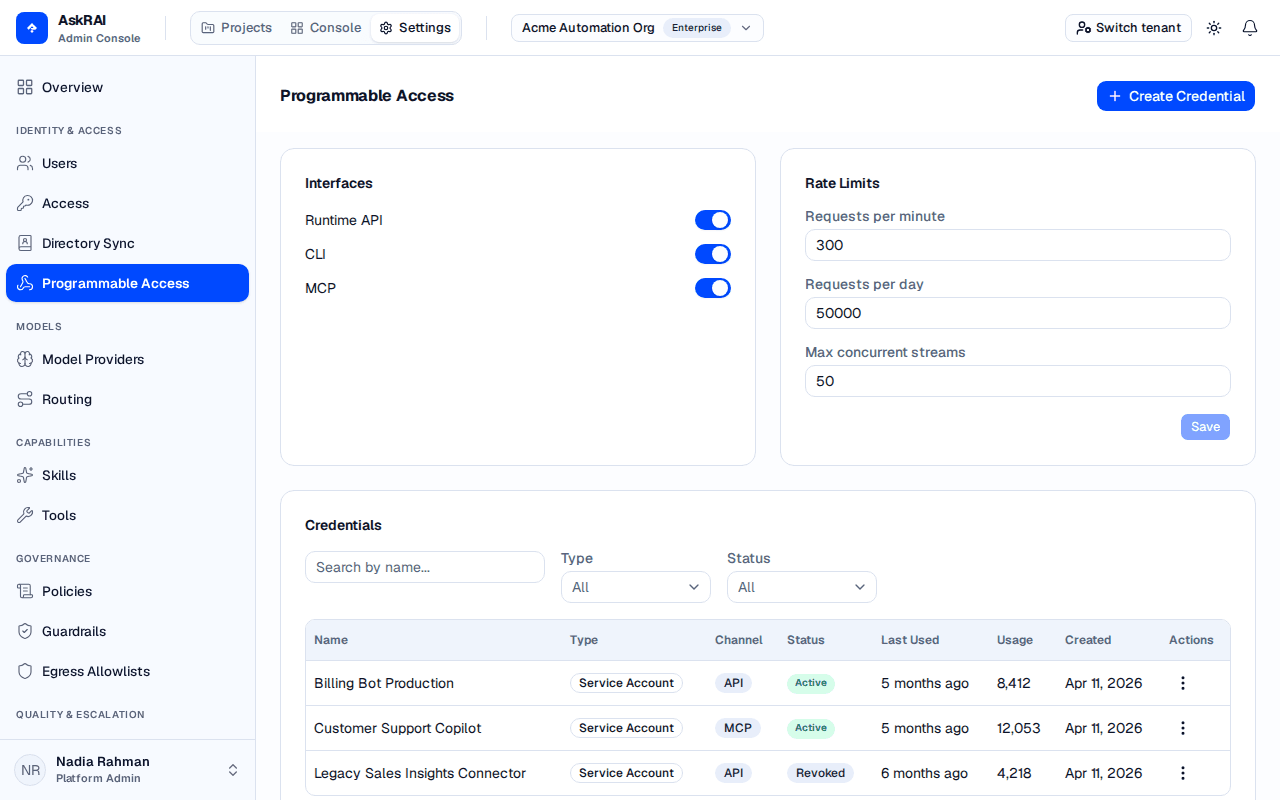
The interface toggles are the outer gate, and they fail closed: turning one off refuses every credential carrying that Channel, however the credential itself is configured.
Programmable Access is a Platform Admin surface. A Member does not see Programmable Access in the Settings sidebar — they cannot open the Settings plane at all — and a Member who follows a direct link to it is sent back to the Projects workspace. Roles are assigned under Settings → Access.
Key concepts
Before issuing credentials, understand the three layers that govern programmable traffic. They are enforced on every request in the order listed:
| Layer | Scope | What it controls |
|---|---|---|
| Interface toggles | Tenant | Which programmable interfaces are available at all (Runtime API, CLI, MCP) |
| Concurrency limits | Tenant and per credential | How many streams may run at once. This is the one traffic limit that is enforced today |
| Credentials | Per credential | Identity, scoping, IP allowlist, expiry, and lifecycle state |
Every request to a programmable interface must present a credential. The credential determines the caller identity and what group access its queries are evaluated against.
The rate-limit panels also expose requests-per-minute, requests-per-day and max prompt characters. Those three are stored but not enforced anywhere on the request path today. Treat concurrency, credential expiry, revocation and the IP allowlist as your real controls.
Interfaces
The Interfaces panel toggles each programmable surface on or off for the entire tenant. Disabling an interface immediately rejects new requests on that surface — existing sessions are not affected, but no new traffic will be accepted.
| Interface | Protocol | Typical caller |
|---|---|---|
| Runtime API | REST over HTTPS | Backend services, internal applications, server-side jobs |
| CLI | REST over HTTPS (via askrai command) | Power users, operators, scripts in terminals |
| MCP | Model Context Protocol over HTTP | AI agents (Claude, Copilot, Cursor, custom agents) |
Leaving an interface disabled is the fastest way to prevent programmatic access entirely. Treat interface toggles as the tenant-wide kill switch for programmable access — credential-level controls sit inside this boundary.
Tenant rate limits
The Rate Limits panel holds the tenant-wide ceilings for programmable traffic. Three knobs are exposed:
| Field | Description | Default | Enforced today |
|---|---|---|---|
| Requests per minute | Intended peak throughput per tenant | 300 | No |
| Requests per day | Intended rolling 24-hour request ceiling | 50,000 | No |
| Max concurrent streams | Maximum simultaneous streaming connections | 50 | Yes |
Type new values and click Save to apply them. The Save button is disabled until you have made a change. Updates take effect for all requests made after the save completes.
Only the concurrency limit is enforced. Max concurrent streams is checked on every request and a caller that exceeds it is rejected. The requests-per-minute and requests-per-day values are stored but not yet enforced — no per-minute or per-day counter runs on any request path, so raising or lowering them changes nothing today. Do not rely on them to cap spend or to throttle a misbehaving integration; use Max concurrent streams, or revoke the credential.
Concurrency is checked at two independent levels, and both must have headroom: the credential's own Max Concurrent override (if set) and the tenant's Max concurrent streams. The tenant value is a hard cap, not a floor — a credential cannot be granted more concurrent streams than the tenant allows.
Credentials
The Credentials table lists every credential issued for this tenant, regardless of status. Each row summarises identity, interface, lifecycle, and usage in a compact form:
| Column | Description |
|---|---|
| Name | Human-friendly identifier chosen when the credential was created |
| Type | One of Personal Token, Service Account, Agent Credential, or Scoped API Key |
| Channel | Interface this credential authenticates against (API, CLI, or MCP) |
| Status | Active, Revoked, or Expired (shown as an additional pill) |
| Last Used | Relative timestamp of the most recent successful authentication |
| Usage | Running counter of successful requests |
| Created | Creation date |
| Actions | Row-level menu with Revoke, Rotate, and Delete |
Filtering credentials
The filter bar above the table narrows the list by name, type, or status:
- Search — free-text match against the credential name
- Type —
All,Personal Token,Service Account,Agent Credential, orScoped API Key - Status —
All,Active, orRevoked
Filters are applied on the server and combined with AND semantics — only credentials matching every selected filter are returned.
Credential types
Choose the type that best reflects who or what will hold the secret. The type drives how the credential is displayed and how its traffic is attributed in the audit trail and on the dashboard.
| Type | Intended holder | Typical lifetime | Notes |
|---|---|---|---|
| Personal Token | A named human, tied to their identity | Short (days to weeks) | Revoke it by hand when the user is offboarded — see the warning below |
| Service Account | An unattended backend service | Medium (months) | The most common choice for server-side integrations |
| Agent Credential | An AI agent acting on behalf of a user | Medium (months) | Carries an agent-specific audit tag. It does not by itself enable agent_augmentation — execution modes are set separately and are available to every type |
| Scoped API Key | A narrowly-scoped integration | Varies | Used when you want an IP allowlist and a tight concurrency cap |
The credential type is a label, not a control. It changes how the credential is displayed and audited — it does not change what the credential is allowed to do. In particular, deleting or deprovisioning a user does not revoke their Personal Tokens: nothing in the offboarding or directory-sync path touches credentials. When someone leaves, revoke their credentials on this page by hand.
Creating a credential
Open the Create Credential Dialog
Click Create Credential in the top-right of the page. A modal opens with the full credential form.
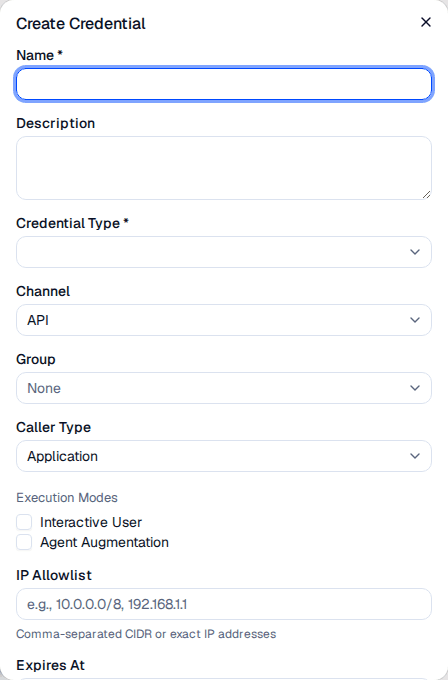
The Create Credential dialog collects identity, scoping, and per-credential override settings in a single form.
Enter Identity Fields
Fill in the required identity fields:
| Field | Required | Description |
|---|---|---|
| Name | Yes | Alphanumeric identifier (max 128 chars). Must start with a letter or digit and may contain hyphens and underscores. Used in logs and the credentials table |
| Description | No | Free-text explanation of what the credential is for (max 500 chars). Appears in the details drawer |
| Credential Type | Yes | One of the four types described above |
Scope the Credential
Choose which interface and audience this credential belongs to:
| Field | Description |
|---|---|
| Channel | Records which programmable interface the credential is meant for — API, CLI, or MCP. It selects which tenant interface toggle is checked; it is not a per-surface restriction (see below) |
| Group | Optional. When set, the credential is added as a member of that group, so its queries are evaluated against the group's knowledge pack and guardrail assignments. Personal Tokens inherit from the user's groups instead |
| Caller Type | Human, Application, or Agent. Drives role mapping rules of the Caller Type rule type — a rule's type is what it reads, its operator is how it compares (equals, contains, in, not_in, between) |
| Execution Modes | Select one or both of Interactive User (a human is in the loop) and Agent Augmentation (an agent synthesises the response). Leaving this empty allows either mode |
Channel does not fence a credential to one surface. The CLI and the MCP server both authenticate to the public API with the same Authorization: Bearer <key> header and send no surface identifier, so the server cannot tell them apart. A credential created with Channel API works from the CLI and from an MCP client. What the Channel value actually does is decide which tenant interface toggle must be enabled for the request to proceed — and if that interface is disabled, the request fails with 401, not 403.
When a credential has execution modes set and a request does not name one, the least-augmenting mode the credential allows is applied — Interactive User whenever it is one of them, whatever order you ticked the boxes in. A request that names a mode outside the credential's list is rejected with 403.
Agent Augmentation is additive, not a replacement. A caller in agent mode still receives the rendered answer; it simply arrives alongside an extra agent_context block (suggested next action, blocked reason, whether the answer was knowledge-grounded, and the source type). The mode also reshapes the summarisation prompt. It never suppresses the answer, so do not use it to withhold prose from a downstream agent.
Add Security Boundaries
Two optional fields further constrain the credential:
| Field | Description |
|---|---|
| IP Allowlist | Comma-separated list of IPv4 addresses or CIDR ranges. Requests from other addresses are rejected with 403. Leave empty to allow any source |
| Expires At | Optional absolute expiration. After this timestamp the credential is treated as expired and rejects new requests with 403. Leave empty for a non-expiring credential |
The allowlist is evaluated after the API key itself is verified, not before it — it narrows where a valid key may be used, and is not a pre-authentication network filter.
(Optional) Override Rate Limits
Expand Per-credential rate limit overrides to set limits for this credential alone:
| Field | Default | Enforced today |
|---|---|---|
| Requests per minute | 60 | No |
| Requests per day | 10,000 | No |
| Max concurrent streams | 5 | Yes |
| Max prompt characters | 10,000 | No |
As with the tenant panel, only Max concurrent streams is enforced. The other three values are persisted and shown in the details drawer but no code reads them on the request path, so they neither throttle a caller nor cap prompt size. They are also not validated against the tenant values — a credential can be saved with numbers larger than the tenant's, and nothing clamps them. The one real ceiling is concurrency, where the tenant cap and the credential cap are both checked and the stricter one wins.
Create and Copy the Secret
Click Create. The server generates the API key and returns it exactly once in a modal:
The API key is shown only at creation time. Copy it to a secret manager immediately — there is no way to retrieve it again. If the secret is lost, rotate the credential to issue a new one.
Use the copy button, paste the key into your secret store, check I have copied this API key, and click Done to dismiss the modal. The new credential appears in the table with Active status and a usage count of zero.
Viewing credential details
Click any credential row to open the details drawer on the right. The drawer is organised into three sections that mirror the create form:
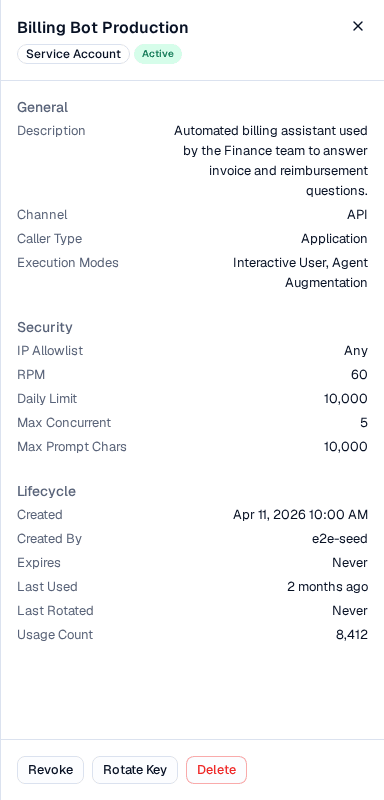
The secret itself is never shown again after creation. Rotate Key issues a new one and invalidates the old immediately, keeping the credential's ID, groups, rate limits and usage history.
| Section | Fields |
|---|---|
| General | Description, Channel, Caller Type, Execution Modes |
| Security | IP Allowlist, per-credential rate limit overrides (RPM, Daily Limit, Max Concurrent, Max Prompt Chars). If no overrides are set, the drawer displays Using tenant defaults |
| Lifecycle | Created timestamp, Created By, Expires At, Last Used (relative), Last Rotated, Usage Count |
The footer exposes three lifecycle actions. Which actions are available depends on the current status of the credential:
| Action | Available when | Effect |
|---|---|---|
| Revoke | Status is Active | Marks the credential Revoked. Future requests are rejected immediately. The credential remains in the table for audit purposes |
| Rotate Key | Status is Active | Generates a new secret for the same credential ID and shows it in the secret modal. The old secret stops working immediately. Usage counts, groups, and rate limits are preserved |
| Delete | Always | Removes the credential permanently. Use Revoke instead if you want to keep an audit trail |
Rotating an active credential invalidates the previous secret immediately. Schedule rotations for windows where callers can pick up the new secret, or rotate credential pairs if you need zero-downtime handover.
Revoking a credential
Open the Details Drawer
Click the credential row or choose Revoke from the actions menu (⋮) on the row.
Confirm the Revocation
A confirmation dialog asks you to confirm. Revoking is a soft-delete: the credential stays visible in the table with Revoked status so auditors can still see who issued it and when, but any further API calls using the secret return 401 Unauthorized.
Usage Overview
The Usage Overview panel at the bottom of the page summarises programmable traffic at a glance. It reads directly from the credential list and updates automatically as you filter or paginate:
| Metric | What it shows |
|---|---|
| Total Requests | Sum of Usage Count across all displayed credentials |
| Active Credentials | Count of credentials currently in Active status |
| Enabled Interfaces | How many of the three interfaces (API, CLI, MCP) are turned on, out of three |
Below the metric cards:
- Requests by Interface — bar chart grouping total requests by channel, useful for spotting interface-level surges
- Top Credentials by Usage — a two-column table (Name, Requests) ranking the busiest credentials. A quick way to find noisy callers
The Usage Overview is scoped to whatever filters you have applied to the credentials table. Clear filters to see a tenant-wide view, or narrow to a single type to spot which credential class is driving load.
How Programmable Access fits the platform
Programmable Access sits alongside the human channel — Teams, the only one delivering traffic today — in the runtime pipeline. A request from a programmable credential is handled the same way as a human request — it is evaluated by guardrails, routed through auto-route or routing rules, and audited into the same conversation log — with two key differences:
- Identity comes from the credential, not from an end-user SSO session. The caller type, channel, caller name, credential ID and credential type travel with the request and surface in the Conversation Logs, Dashboard, and Sandbox panels. The group is not sent with the request — instead, the credential is enrolled as a member of the group when you create it, so group-scoped knowledge and guardrails resolve from that membership.
- Execution modes let you opt into agent-friendly response shapes.
agent_augmentationadds a structuredagent_contextblock (suggested next action, blocked reason, grounding, source type) alongside the rendered answer.
Credentials also participate in the role system. When you create a role under Users, Roles & Groups, you can match on Caller Type or Credential Type in addition to Channel, Auth status, Device or Referrer — giving you the same declarative access model for machine traffic that you use for human traffic.
Related pages
- Users, Roles & Groups — define Caller Type and Credential Type rules that map programmable traffic to roles
- Sandbox — test credential behaviour, including group resolution and execution modes, before pointing live traffic at the credential
- Dashboard — monitor programmable traffic volume and top callers across your tenant
- Conversation Logs — filter by API, CLI, or MCP channel and by caller type to investigate specific credential activity
- Model Routing — set tenant-level fallback models for the pipeline stages exercised by programmable traffic