Model Routing
Configure which AI models handle different pipeline stages and define rules to route requests based on context
Model Routing controls which AI models process each stage of the response pipeline. Configure default models, enable automatic complexity-based routing, and create rules that match requests by channel, authentication status, device type, or user group. Changes follow a draft-and-publish workflow with full version history and rollback support.
To open it, switch to the Settings plane from the top navigation bar and select Routing in the Settings sidebar.
Routing is restricted to Platform Admins. A Member who opens it is redirected away, and the Settings control is hidden for them entirely — see Access.
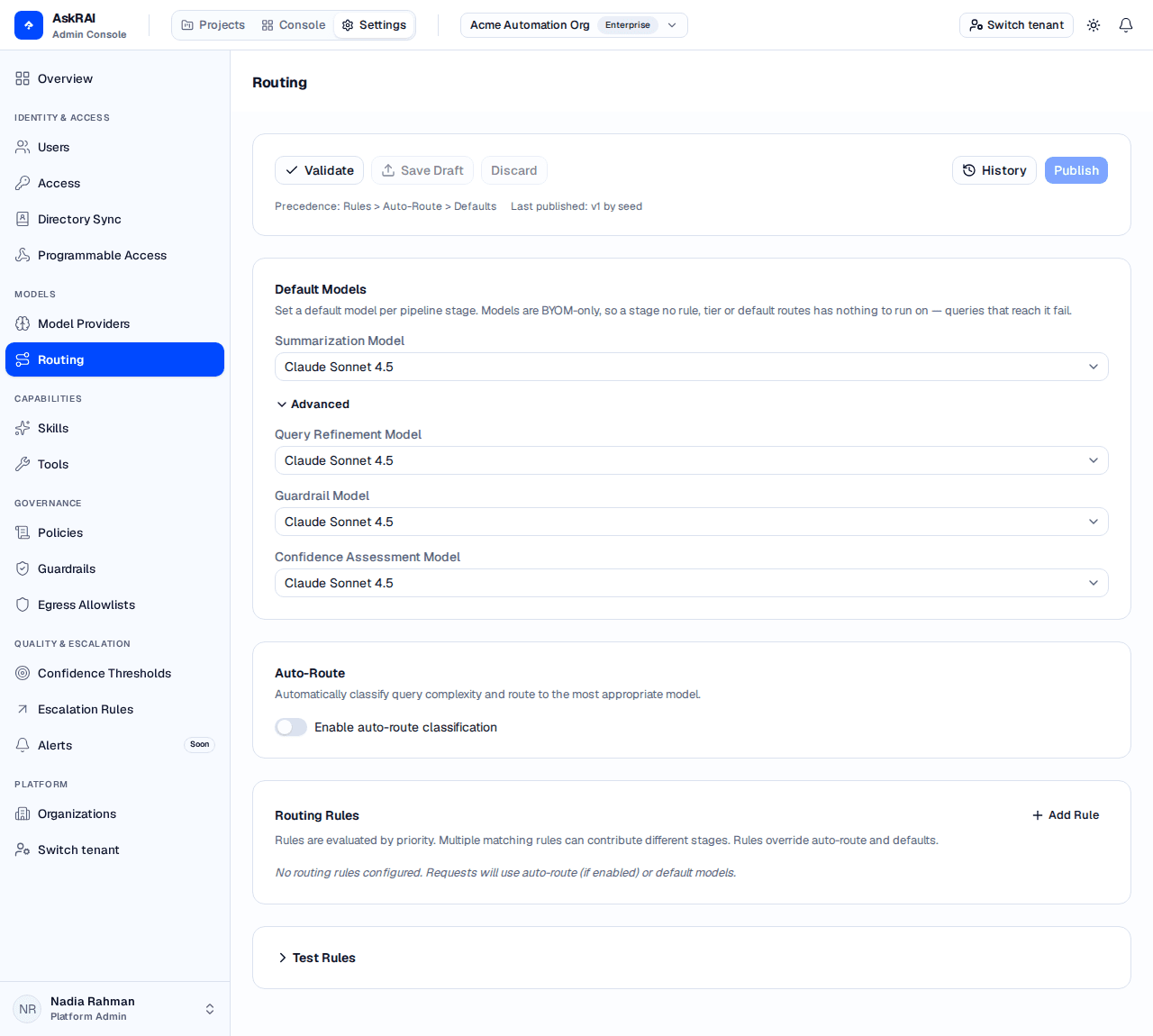
Everything below the publish bar is a draft. Nothing on this page affects a live query until you publish it.
Key concepts
Before configuring routing, understand the three layers that determine which model handles a request. They are evaluated in order of precedence:
| Layer | Description | Precedence |
|---|---|---|
| Routing Rules | Match requests by context (channel, auth status, device type, group, role, complexity) and assign specific models | Highest |
| Auto-Route | Classify query complexity as simple, moderate, or complex, then map each tier to a model | Medium |
| Defaults | Tenant-level fallback models for each pipeline stage | Lowest |
There is no fourth layer beneath these. Every model AskRAI runs is one your tenant registered under Model Providers, so a stage that no layer assigns has nothing to fall back on — and what happens then depends on the stage. Summarization has nowhere to go without one, so the request fails; guardrail evaluation fails the same way, but only for a tenant whose guardrails include an LLM judge — the deterministic kinds need no model. Query refinement is the only stage that degrades quietly — it answers on the unrefined question. Confidence assessment fails closed: every answer it scores comes back 0.0, so the answer bands Low for the user, 0.0 is what the audit record keeps, and any Escalation Rule on the Low band fires on that conversation. It scores every generated answer — a curated answer served straight from the knowledge base is banded from its own score and is unaffected. The retrieval relevance score is recorded alongside it but is not what bands the answer. Set a tenant default for every stage you rely on.
Pipeline stages
Each request passes through up to four pipeline stages. You can assign a different model to each:
| Stage | Purpose | Typical Model |
|---|---|---|
| Summarization | Synthesizes the final response from search results | High-quality model (e.g., GPT 5.2) |
| Query Refinement | Resolves conversational references into self-contained queries | Fast model (e.g., GPT 4.1 Mini) |
| Guardrail | The model an LLM-judge guardrail puts its rule to, at whichever stage that guardrail reads | Fast model (e.g., GPT 4.1 Nano) |
| Confidence Assessment | Scores how well the retrieved knowledge supports the answer | Fast model (e.g., GPT 4.1 Nano) |
Draft and publish workflow
Routing configuration uses a draft-and-publish workflow. Changes you make on the page are local edits until you save them as a draft. The draft must then be published to take effect in production.
The publish bar at the top of the page shows:
| Control | Description |
|---|---|
| Validate | Checks the configuration for errors — for example a rule that sets no model at all. A rule with no target model is valid provided it overrides at least one stage |
| Save Draft | Persists your edits as a draft without affecting production |
| Discard | Reverts all unsaved local edits back to the last saved draft |
| History | Opens the version history drawer to compare or rollback versions |
| Publish | Promotes the saved draft to production (disabled until a valid draft is saved) |
Publishing a routing configuration takes effect immediately for all new requests in your tenant. Test changes in the Sandbox before publishing to production.
Default models
The Default Models section sets tenant-level fallback models for each pipeline stage. If no routing rule or auto-route tier assigns a model for a stage, the default is used.
Select a model from the Summarization Model dropdown to set the primary default. Expand the Advanced section to override the Query Refinement, Guardrail and Confidence Assessment models separately.
Leave a dropdown on No override and that stage has no tenant default at all. Nothing falls through to the Summarization Model — it is the summarization stage's own default and no other stage's. The single exception is Confidence Assessment, which reuses the Query Refinement Model when its own is left on No override. Routing rules and auto-route tiers fall through to these defaults; nothing falls through beneath them, which is the state the note above describes.
Every model dropdown lists your tenant's own models from Model Providers, tagged with the provider each came from, and, for the per-stage selects, only those a model declares support for that stage. The classifier select is not stage-filtered and lists every registered model. A dropdown with nothing in it reads "No model supports this stage" — register a provider, or enable a model on one you already have.
Auto-route
Auto-route automatically classifies each incoming query by complexity and routes it to the most appropriate model. This optimizes cost and performance by sending simple queries to faster models and reserving powerful models for complex requests.
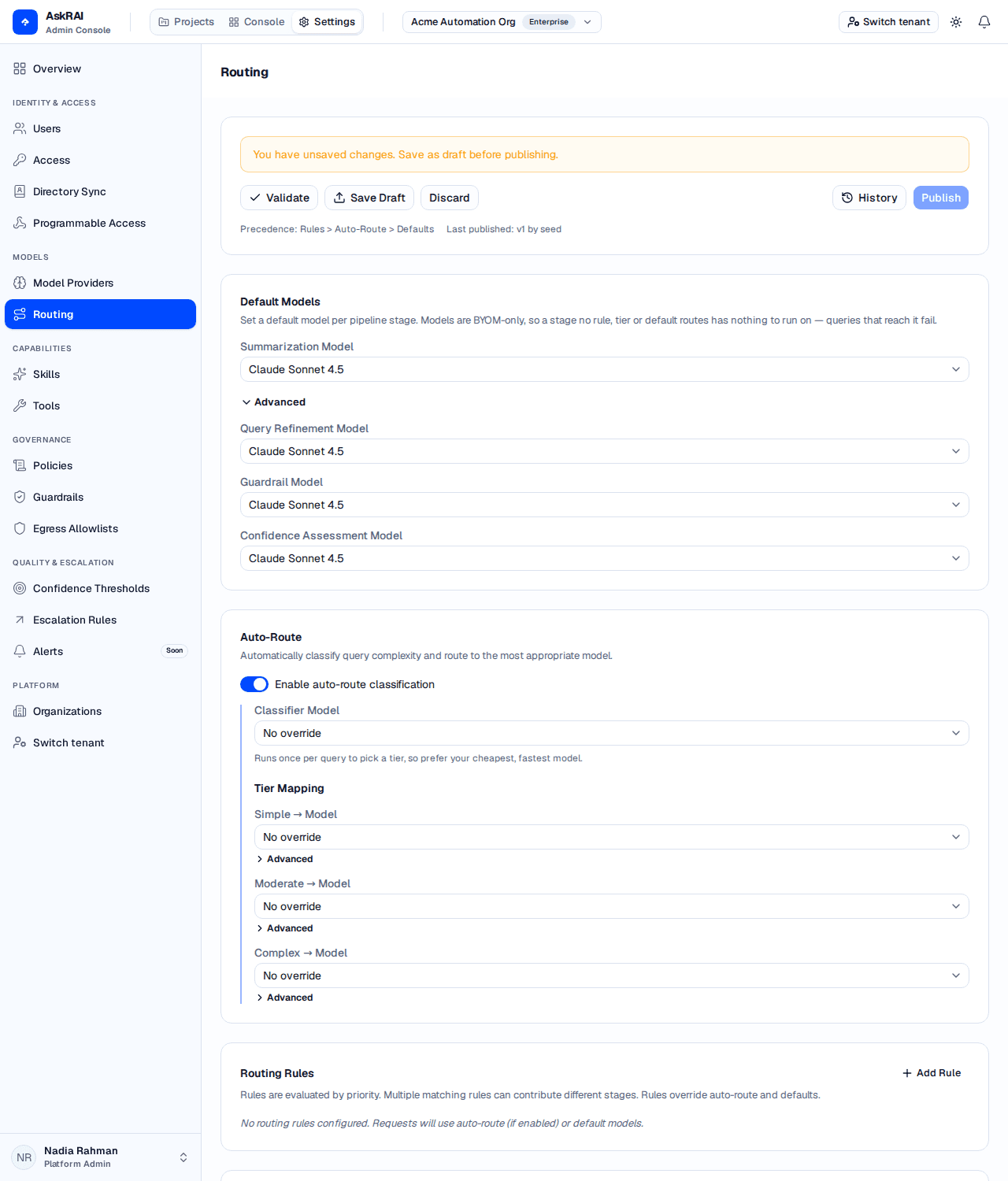
The classifier is itself a model call on every query, so it is worth pointing at a cheap, fast model — its only job is to decide which tier the question belongs to.
Enabling auto-route
Toggle Enable auto-route classification to activate this feature. When enabled, two additional configuration areas appear:
- Classifier Model — the model that evaluates query complexity. Every query pays its latency, so a small, quick model is the right choice.
- Tier Mapping — assign a summarization model (and optionally query refinement and guardrail models) for each complexity tier.
Tier configuration
| Tier | When Used |
|---|---|
| Simple | Straightforward factual queries that require minimal reasoning |
| Moderate | Multi-step questions that need some analysis or comparison |
| Complex | Queries requiring deep reasoning, multi-document synthesis, or specialized knowledge |
For each tier, select a primary model from the dropdown. Expand Advanced under each tier to set stage-specific overrides for query refinement and guardrail models.
Routing rules
Routing rules let you assign models based on request context. Rules are evaluated by priority — lower numbers run first. Multiple matching rules can contribute different stages (one rule might set the summarization model while another sets the guardrail model).
Creating a rule
Open the Rule Editor
Click Add Rule in the top-right corner of the Routing Rules section.
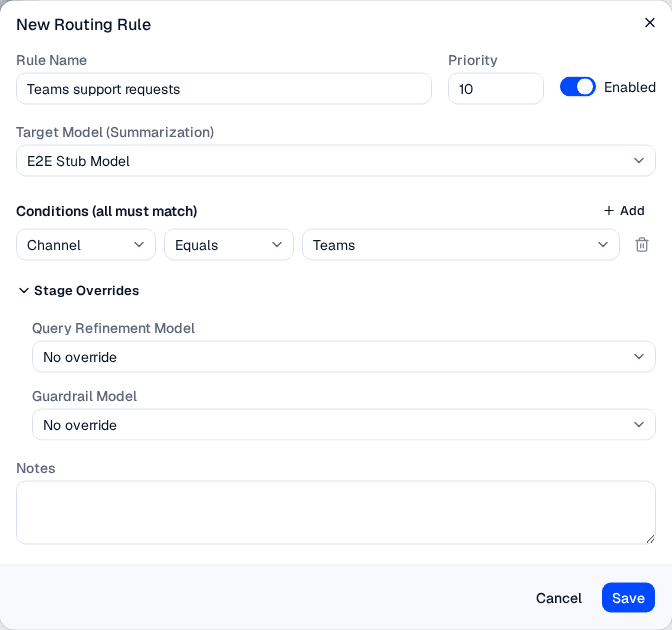
The rule editor, filled in — a rule that routes Teams requests to one model. The Target Model list offers only the models you registered under Model Providers.
Set the Rule Name and Priority
Enter a descriptive name for the rule. Set the Priority number — rules with lower priority values are evaluated first. Toggle Enabled to activate or deactivate the rule without deleting it.
Choose the Target Model
Select a Target Model (Summarization) from the dropdown. This is the primary model assignment for matching requests. The dropdown offers No override plus your tenant's own registered models that support the summarization stage — there is no platform-supplied entry to pick, and the control is disabled outright when none of your models support the stage.
Expand Stage Overrides to optionally set different models for query refinement and guardrail stages.
Define Conditions
Add one or more conditions that a request must match for this rule to apply. All conditions must match (AND logic).
Save the Rule
Click Save to add the rule to your configuration. The rule appears in the list sorted by priority.
Condition fields
Each condition matches a request attribute against a value:
Each field below (except Group ID) is a fixed dropdown — these are the complete option lists, not examples:
| Field | Description | Values |
|---|---|---|
| Channel | The communication channel the request arrived on | Teams, Web Chat, WhatsApp, SMS, Phone, Email, Mobile App, API, CLI, MCP |
| Auth Status | How the caller authenticated | Authenticated, Unauthenticated, API Key, Executive SSO, Service Credential |
| Device Type | The device category | Desktop, Mobile, Tablet, API |
| Group ID | The groups the caller resolved into | Free-text group ID |
| Role Category | The categories of the roles the request matched | Public Access, Employee Access, Admin Access, API Access, System Access |
| Complexity Tier | The auto-route complexity classification (requires auto-route enabled) | Simple, Moderate, Complex |
Group ID matches against every group the caller resolved into — those assigned to them directly, and those reached through a role whose mapping rules matched the request. Automatic groups are not among them: nothing supplies the user attributes those rules read, so an automatic group never contributes to routing. Role Category matches the categories of the roles the request matched, whether or not those roles lead to a group. A caller who resolves into no groups at all is a real answer, not a blank: a not_in rule is satisfied by it.
Do not route on Device Type. No shipped caller sets it — Teams, the web API, the CLI and the MCP server all leave it empty — so a rule on it matches nothing, whichever operator you choose. It is the only condition field in this table that is not populated.
Operators
| Operator | Description |
|---|---|
| Equals | Exact match against a single value |
| Not Equals | Matches any value except the specified one |
| In List | Matches any of the specified values |
| Not In List | Matches none of the specified values |
Rules override auto-route and defaults. If a rule assigns a summarization model, it takes precedence over the auto-route tier mapping and the default model for that stage.
Testing rules
The Test Rules section at the bottom of the page lets you simulate a request and see which rules match and which models are resolved for each stage.
Select values for the context fields (channel, auth status, device type, group ID, role category, and complexity tier if auto-route is enabled), then click Evaluate. The result shows:
- Source — where the final model selection came from (Tenant Default, Routing Rule, Auto-Route, Merged Rules, or Not configured when nothing assigned the stage a model)
- Resolved Models — which model handles each pipeline stage (summarization, refinement, guardrail) and the source of each assignment
- Matched Rules — which rules matched the test inputs, sorted by priority
The rule tester evaluates against your current unsaved configuration, so you can try changes before saving or publishing. It is a separate implementation from the runtime, and two differences are worth knowing. Leaving a field blank means "not supplied" in both, so a blank never matches — but the tester has no way to say "resolved into no groups", which in production does satisfy a not_in rule. And Device Type is a live control here while no real caller sets it, so a rule the tester matches on Device Type will never match a real request.
Version history
Click History in the publish bar to open the version history drawer. Each published configuration is stored as a numbered version.
For each version, you can:
- Compare an archived version with the current published version to see what changed
- Rollback to restore an archived version as the active configuration
Rolling back to an earlier version permanently deletes every routing version newer than the rollback target. This action cannot be undone. Other versioned areas behave differently — rolling a skill back keeps its history and republishes the older content as a new version.
Related pages
- Settings — configure confidence thresholds and escalation rules
- Sandbox — test AI responses with different model configurations
- Conversation Logs — review audit records showing which models and rules were used
- Guardrails — configure safety policies evaluated by the guardrail model
- Users, Roles & Groups — manage groups and roles used as routing rule conditions