Change Log
See who changed anything in Admin, from people and access to models, capabilities, governance and organizations, when, and what changed
The Change Log is your tenant's record of what was changed in Admin: who made each change, when, and what it changed. Open it with the Admin control in the top navigation bar, then choose Change Log under Platform.
The Change Log is read by the holders of View change log: Platform Admins, Auditors, and anyone holding a role built with it on Access. It changes nothing itself: reading it is all it offers. An Auditor sees Admin with only the Change Log in it, and can open no other Admin page or change anything there.
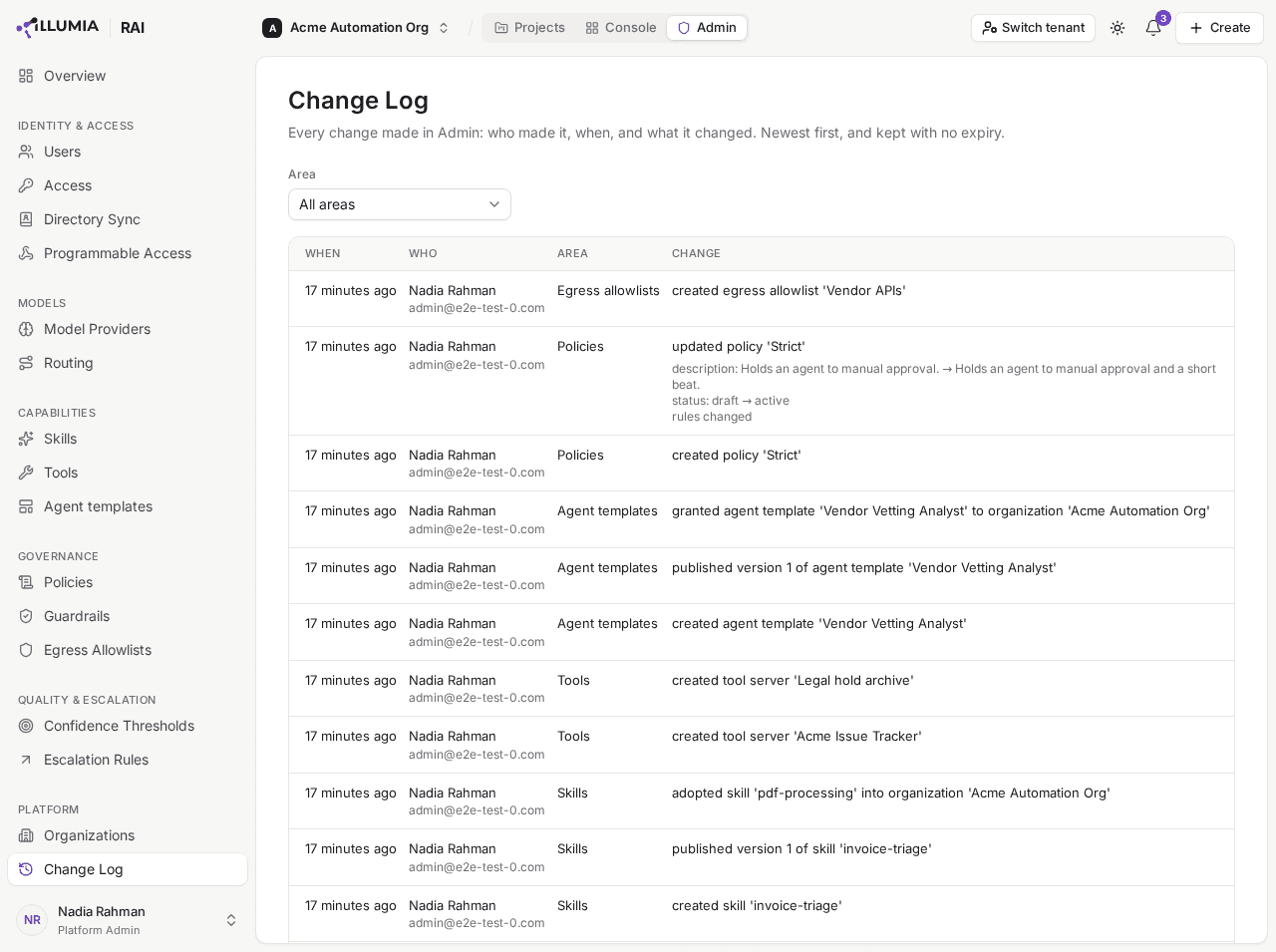
Each edit lists the settings it changed, old value to new.
What it records
These changes in Admin each appear as one entry, once the change has been saved. Each entry is filed under an Area of Admin, listed here in the order the Admin sidebar shows them.
Identity & Access
- Users: a person's status changed; a group created, edited or deleted, people added to it or removed from it, or its roles, knowledge packs, guardrails or automatic assignment rules changed; a role created, edited or deleted.
- Access: a role built on Access created, edited or deleted; a role assigned to a person or a group, or an assignment removed. Also an organization or a project shared with a person, a group or everyone in the tenant from its Share dialog, the level of a grant changed, or a grant removed: granted Write on project 'Onboarding Automation' to user 'Nadia Rahman'.
- Directory Sync: SCIM provisioning switched on or off, and its token generated, rotated or revoked; a group linked to a directory group or unlinked from one, on the group's Directory tab in Users; Google Workspace sync configured, disconnected, switched on or off, or a sync started with Sync now. A Test connection records nothing.
- Programmable Access: an API credential created, edited, rotated, revoked or deleted; an interface switched on or off, or the tenant rate limits changed.
Models
- Model Providers: a provider added, edited or deleted, and a model added to it, edited in place or removed.
- Routing: the draft saved, a version published, or a rollback to an earlier version.
Capabilities
- Skills: a skill created, edited, published, rolled back or deleted; its agents moved onto the published version with Force update; a platform skill adopted into the organization or removed from it.
- Tools: a tool server connected, edited, synced or deleted (a sync says how many tools it added, changed or removed, and any change to the server's status); its tools approved, switched on or off, or marked read-only or side-effecting; the server granted to an organization or withdrawn from one. For a hosted tool server, also its source saved, a release published, approved or reverted, and a secret set or removed.
- Agent templates: a template created, whether new, from an agent, by import or as a copy; one edited, published, rolled back or deleted; a template granted to an organization or withdrawn from one; a suggested template approved or rejected.
Governance
- Guardrails: a guardrail created, copied, edited or deleted.
- Policies and Egress Allowlists: one created, edited or deleted.
Quality & Escalation
- Confidence Thresholds: the thresholds changed.
- Escalation Rules: the rules changed.
Platform
- Organizations: an organization created, edited or deleted.
A change made on a project's Team pane is recorded in that project's Activity instead.
Reading an entry
Each entry says:
- When the change was made. Hover the time to see the exact date and time.
- Who made it, by the name and email their sign-in carried at the time, so an entry still names someone who has since left your directory. A change made by AskRAI support while helping your tenant is marked RAI staff.
- What was changed, named as it was then: deleted guardrail 'PII filter', withdrew tool server 'GitHub' from organization 'Acme'. Something whose name could not be read is named by its kind, as a guardrail not found.
- For an edit, each setting it changed, with its old and new value where both are short, such as status: draft → active. A role's permissions, and a choice such as a guardrail's kind, read as their editor names them: permissions: View users & groups → View users & groups, View routing. A longer value, such as a guardrail's prompt or a routing rule, is named without its contents, and so is an address such as a tool server's URL, which can carry a key. A secret is never shown, whether a credential, a token or a hosted tool server's secret: a new key reads as credentials changed.
An edit that changed nothing, and a change that was refused, leave no entry. Switching a tool on or off is recorded as it was set, even when it already was.
Find a change
Entries are listed newest first. Choose an Area to see only the changes made there; the page remembers the area in its link, so you can share a filtered view with another Platform Admin or an Auditor.
Entries are kept with no expiry.