Policies
Bundle guardrails with the ceilings an agent runs under — autonomy, actions per beat, tool calls per beat and approval requirements — and attach the result to an agent or a group
A policy is what an agent or a group is governed by: the guardrails it carries, and the ceilings it sets. Settings → Policies is where policies are written. Open it with the Settings control in the top navigation bar, then choose Policies under Governance in the Settings sidebar.
Policies, Guardrails and Egress Allowlists are one plane, reserved for Platform Admin. The same role is required to attach governance, even though attaching happens on the Team pane — without that rule, any member of the tenant could strip every control off an agent.
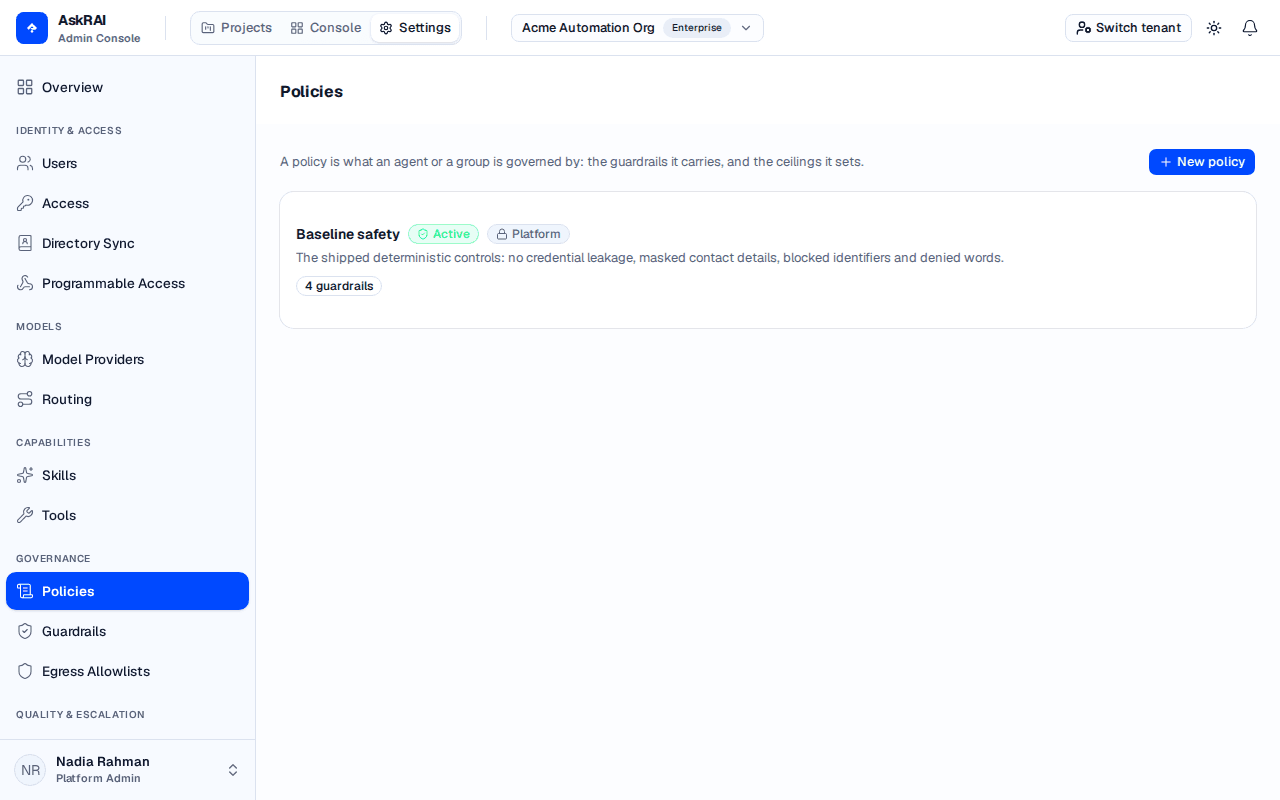
Each card summarises what the policy actually constrains, rather than leaving it to be inferred.
Everything a policy sets is a ceiling
This is the single most important property of the model. A policy never grants anything. Every clause is an upper bound, and composing two policies takes the tighter of each:
- Numeric ceilings take the minimum.
- Autonomy can only move an agent down the list.
- Approval requirements are unioned — if either policy requires approval, approval is required.
- A host must be admitted by every egress allowlist in force.
- Guardrails are added together.
Attaching a second policy can therefore only narrow what an agent may do, never widen it. That is what makes it safe to hand an agent a broad policy and a narrow one at the same time.
What a policy carries
Guardrails
Any number of guardrails, up to 100. Every guardrail a policy carries is added to whatever else governs the subject.
Only Active guardrails take part. A draft can be listed in a policy and attached with it, and it checks nothing — the picker shows each guardrail's status badge so you can see that before you save.
An egress allowlist
At most one, or None. It names the hosts the agent's tools are allowed to reach. Because a host must be admitted by every allowlist in force, adding one to a second policy can only narrow the reach.
A Link domain guardrail has no hosts of its own and reads whatever allowlist is in force, so a policy that carries one must name an allowlist as well. Saving an Active policy that carries a Link domain guardrail and names none is refused — without an allowlist to compare against, that guardrail cannot be evaluated at all.
Ceilings
| Ceiling | What it bounds |
|---|---|
| Maximum autonomy | How much a beat may do on its own — Manual, Suggest or Full. |
| Actions per beat | How many actions one beat may take. 1 to 20. |
| Tool calls per beat | How many tool calls one beat may make. 1 to 20. |
| Require approval for | Read-only tools, Tools that change something, or both. |
Leave a ceiling blank and this policy sets none there. Blank is not zero — zero is a value the server refuses, and it would read like the tightest possible setting rather than the refusal it is.
There is no separate approval control on an agent. An approval requirement is a policy clause, so it is something a policy brings rather than a fourth thing to attach.
Status
A policy is Draft or Active. Only an Active policy is in force; a draft can be attached and listed and governs nothing. The page states the count above the list when any policy on it is still a draft.
Create a policy
Select New policy. The editor opens as a sheet on the right.
Give it a Name and a Description. Name it after the population it governs — "Customer-facing agents" — rather than after the controls inside it, which will change.
Choose the Guardrails it carries. The picker is searchable and shows each guardrail's kind and status.
Choose an Egress allowlist, or leave it on None.
Set the Ceilings you want to impose, and leave the rest blank.
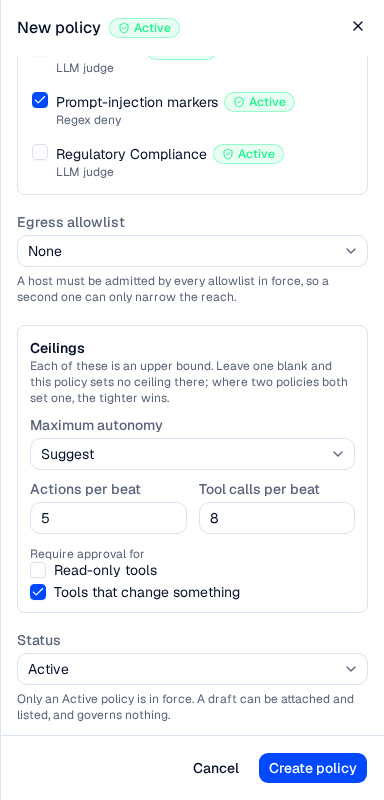
Each ceiling is an upper bound; where two policies both set one, the tighter wins.
Leave Status on Active and select Create policy.
Attach a policy
Writing a policy governs nothing on its own. Attach it to a subject, and which subject you choose decides which traffic it governs:
- An agent — open the agent on the project's Team pane and use its Guardrails tab. This governs that agent's beats.
- A group — attach it to a native group on the Users page. This governs the console and channel turns of the people in that group; a caller's groups are resolved on every turn and narrowed together into one effective set.
A subject may carry up to 25 policies, plus guardrails and an allowlist attached directly. The agent's Guardrails tab shows an In force panel that asks the server what the current selection actually composes to, and re-asks it on every change. That panel is the only place the narrowing is visible before a beat runs — including narrowing you did not intend.
Detaching governance is a widening, and nothing about an empty selection is invalid, so it validates clean. Attachment is gated on the governance permission for exactly that reason: without it, stripping every control off an agent would be an ordinary edit.
Policies that ship with AskRAI
Every tenant is seeded with Baseline safety, a platform policy bundling the shipped deterministic controls: no credential leakage, masked contact details, blocked identifiers and denied words. It carries a Platform badge.
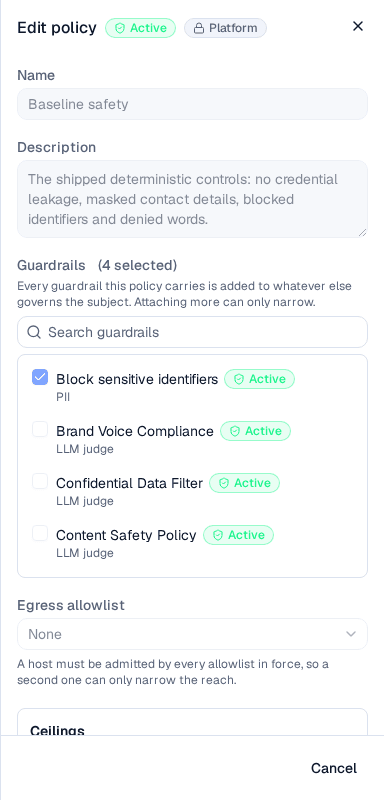
A platform policy is inspectable but not editable — write your own alongside it.
Platform policies are read-only: the server refuses an edit or a delete. Unlike a guardrail, a policy has no duplicate action, so the editor says plainly that it cannot be changed rather than offering a Save that would fail. Write your own alongside it — composing a second policy can only narrow what an agent may do, so adding one never weakens the baseline.
Seeding a tenant changes no traffic. A policy governs a turn only once something attaches it.
Delete a policy
Delete is on the left of the editor footer. Before you can confirm, the dialog reads how many agents and groups attach the policy and states the count, because that number is the whole question — deleting a policy nothing uses is housekeeping, and deleting one that governs a live team is not. If that lookup fails, the dialog says so rather than showing a reassuring zero.
Deleting is permanent, and the policy stops governing everything it is attached to.
A policy that constrains nothing
A policy with no guardrails and no ceiling is legal, and the list flags it: "This policy carries no guardrails and sets no ceiling — attaching it changes nothing." It is worth writing one deliberately as a placeholder, but it is more often a policy someone emptied without noticing.
Field reference
| Field | Notes |
|---|---|
| Name | Required. Up to 120 characters. |
| Description | Optional. Up to 500 characters. |
| Guardrails | Up to 100. Only Active guardrails take part. |
| Egress allowlist | At most one, or None. |
| Maximum autonomy | Manual, Suggest, Full, or no ceiling. |
| Actions per beat | Whole number, 1 to 20, or blank for no ceiling. |
| Tool calls per beat | Whole number, 1 to 20, or blank for no ceiling. |
| Require approval for | Read-only tools and/or Tools that change something. |
| Status | Draft or Active. Only Active is in force. |
Related pages
Guardrails
Author the individual checks a policy bundles.
Team
Attach a policy to an agent and read what it composes to.
Governance concept
How governance and the audit trail fit together.
Interactions
What a beat is, and what the per-beat ceilings bound.
Egress Allowlists
Write the host list a policy carries.
Tools
Connect MCP tool servers, review every tool a server offers before an agent can call it, and grant servers to the organizations that may use them
Guardrails
Author the checks that inspect what reaches an agent, what it says, and what it sends to a tool — their kind, stage, action, and whether they are in force