Guardrails
Author the checks that inspect what reaches an agent, what it says, and what it sends to a tool — their kind, stage, action, and whether they are in force
A guardrail is one check: what it reads, what it does about a violation, and whether it is in force at all. Settings → Guardrails is where guardrails are defined. Open it with the Settings control in the top navigation bar, then choose Guardrails under Governance in the Settings sidebar.
Guardrails, Policies and Egress Allowlists are one plane, reserved for Platform Admin — a Member sees none of the three. Grant the role on the Access page.
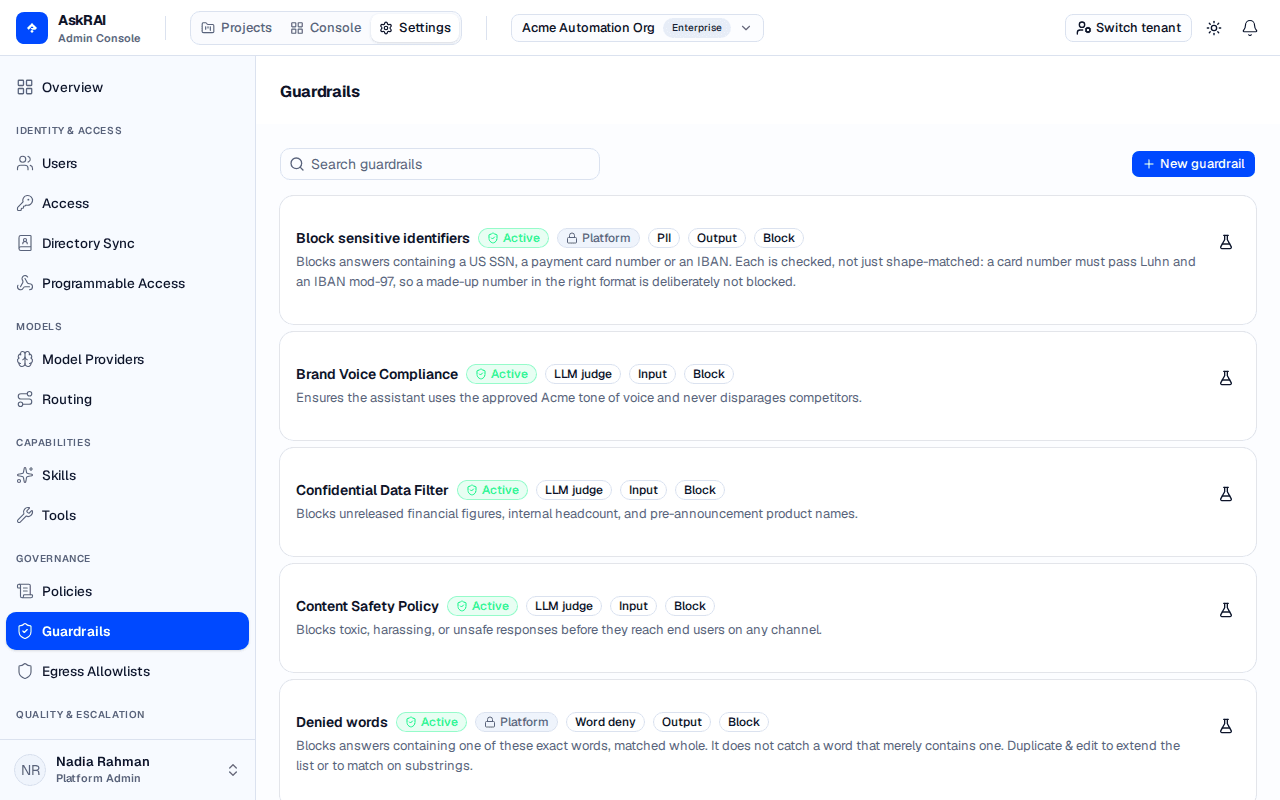
Each card carries the guardrail's status, its kind, the stage it runs at, and what it does about a violation.
Two pages named Guardrails
The console also has a Guardrails page, and the two do different jobs:
| Page | What it is for |
|---|---|
| Console → Guardrails | The analytics — how often each guardrail fired, against what, and its false-positive rate. It also edits a guardrail's name, category and priority. |
| Settings → Governance → Guardrails (this page) | The definition — the kind of check, the stage it runs at, the action it takes, its per-kind configuration, and whether it is Active. |
Both list the same guardrails. The console page links here with Edit in Settings whenever you need to change what a control actually does.
What a guardrail is made of
Four choices decide a guardrail's behaviour. Everything else on the form is specific to the kind you chose.
Kind — what it looks for
The kind decides how the check is performed, and which configuration fields the form offers you.
| Kind | What it does |
|---|---|
| PII | Finds personal identifiers — email, phone, US Social Security number, payment card, IBAN. |
| Regex deny | Refuses anything matching your patterns. |
| Word deny | Refuses specific terms. |
| Secret scan | Finds API keys, tokens and private keys. |
| Link domain | Refuses links to hosts no egress allowlist in force admits. |
| LLM judge | Asks a model your prompt about the payload. |
The five deterministic kinds cost no model call. LLM judge is the only kind that reaches a provider, which is why it is the only one that needs a model and a prompt.
Stage — which payload it reads
| Stage | What it inspects |
|---|---|
| Input | What reaches the agent — the user's question, or another agent's message. |
| Output | What the agent is about to say or record. |
| Tool call | The arguments the agent is about to send to a tool. |
Stage matters more than it looks. A guardrail named "mask contact details" that only ever reads the question fires on nothing and reports compliance — the shape this plane exists to remove. If the rule is about the answer, set the stage to Output.
Action — what it does about a violation
| Action | Effect |
|---|---|
| Block | Stops the turn. |
| Warn | Lets the turn continue and leaves a record. |
| Redact | Substitutes what it found and continues. |
Redact is offered only for the kinds that can return the spans to substitute — PII, Regex deny, Word deny and Secret scan. Link domain and LLM judge return a verdict, not spans, so the form hides Redact when one of those is selected, and steps a chosen Redact back to Block.
Status — whether it is in force
A guardrail is Draft or Active. Only an Active guardrail is evaluated: a draft can be authored, listed and attached to an agent while checking nothing. That is deliberate — it is how you stage a control before it governs anyone — but it also means a plane full of drafts reports coverage it does not have. The page states the count above the list when any guardrail on it is still a draft.
New guardrails are offered as Active.
Create a guardrail
Select New guardrail. The editor opens as a sheet on the right.
Give it a Name and a Description. The name is how the guardrail is identified in the guardrail analytics and in this list, so name it after the rule rather than the mechanism.
Choose the Kind, then the Stage and the Action. Each control shows a one-line explanation of the current choice beneath it.
Fill in the configuration the kind needs — the form offers only the fields that kind actually reads.
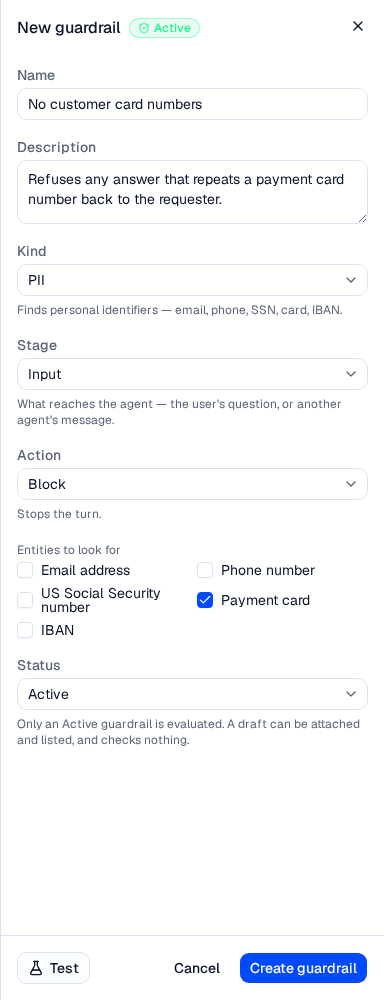
Choosing PII replaces the configuration area with the entity checkboxes; choosing another kind replaces it again.
Leave Status on Active and select Create guardrail.
Switching kind mid-edit clears the fields the new kind does not read. The server refuses a field its kind does not use, so the form drops them rather than letting you submit a request that would be rejected for naming a control the form has stopped showing.
Configuration by kind
| Kind | Fields the form offers |
|---|---|
| PII | Entities to look for — any of Email address, Phone number, US Social Security number, Payment card, IBAN. An active PII guardrail needs at least one. Plus Replacement, when the action is Redact. |
| Regex deny | Patterns — Python regular expressions, at most 25, each at most 200 characters. Plus Replacement, when the action is Redact. |
| Word deny | Words — at most 500, each at most 100 characters. Match case exactly. Where a word may appear. Plus Replacement, when the action is Redact. |
| Secret scan | Replacement, when the action is Redact. Nothing else — the detectors are built in. |
| Link domain | None. It compares links against the egress allowlists in force on whatever it is attached to. |
| LLM judge | Judge model — one of the models your tenant has connected — and Prompt. |
Word matching
Where a word may appear has two settings, and neither is free:
- Whole words only (the default) does not match inflections. A list containing
refunddoes not catchrefundsorrefunding. Add the forms you mean. - Anywhere inside a word catches inflections, and also matches inside unrelated words — a list containing
classthen refuses an answer that mentions classical or classify. Profanity lists are where this bites hardest, because so many short offensive words are substrings of ordinary ones.
Which error is cheaper depends on your own vocabulary.
Regular expressions
Patterns are Python regular expressions and are validated as you add them. A pattern that repeats a group without a bound — the shape that can stall a turn on a crafted input — is refused at the write boundary, so (?:all |any |your )* will not save.
Link domain needs an allowlist
A Link domain guardrail carries no hosts of its own. Attach it to a subject that also carries an egress allowlist. With no allowlist in force it cannot be evaluated at all, and it stops the turn under its own name rather than passing quietly.
Test a guardrail before it governs anything
Every card has a flask icon, and the editor has a Test button. Both open a drawer that runs a sample payload through that one guardrail exactly as a live turn would. The definition travels by value, so you can test a draft you have not saved yet.
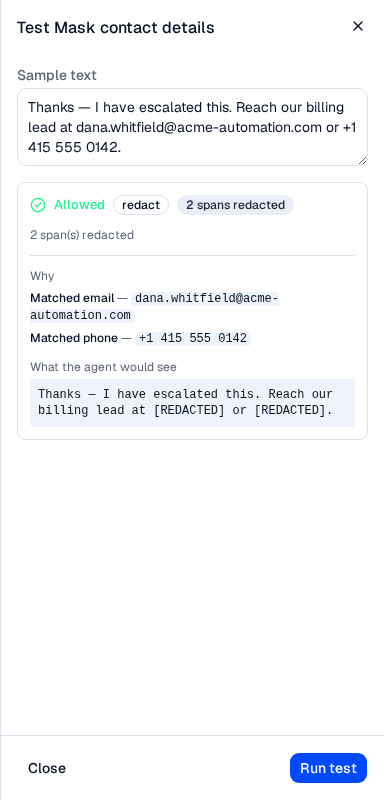
The drawer reports the verdict, why it fired, and what the agent would actually see.
The result has three parts:
- The verdict — Allowed or Blocked, the action taken, and how many spans were redacted.
- Why — every span the detector matched, and every near miss: a candidate that had the right shape and failed the check behind it, such as a card-shaped number that fails its checksum. This is the only place that answers "I pasted something that looks like a card number and it says Allowed".
- What the agent would see — the payload after redaction, the note that nothing changed, or the statement that the turn is refused.
Nothing in the test drawer is stored or audited. The excerpts are sliced out of the sample you typed, and they locate exactly the content a Redact guardrail exists to keep out of the audit trail.
If the guardrail cannot be evaluated at all, the drawer says Could not be evaluated rather than reporting a pass. An unevaluable control is not a clean payload, and a live turn stops there too.
Guardrails that ship with AskRAI
Every tenant is seeded with a catalog of platform guardrails, marked with a Platform badge. They are read-only here: the server refuses an edit or a delete, so the editor shows the fields for inspection and offers no Save.
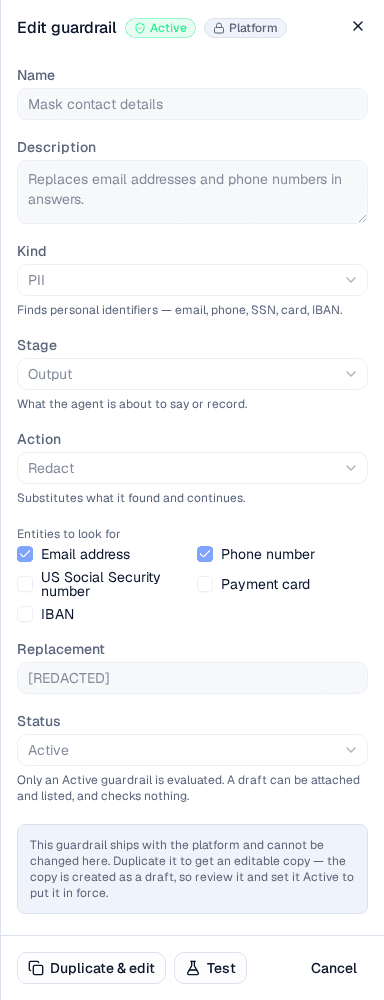
A platform guardrail is inspectable but not editable — Duplicate & edit is how you change one.
To change a platform guardrail, select Duplicate & edit. The server clones it as an editable tenant copy, and the editor stays open on the copy. The copy is created as a Draft, so review it and set it Active to put it in force.
Seeding a tenant changes no traffic on its own. A platform guardrail governs a turn only once something attaches it — directly, or through a policy.
Find a guardrail
The list shows ten guardrails per page. The search box searches the whole tenant on the server, not just the page you are looking at, so a guardrail on page three is reachable by name. Use the pagination control beneath the list to move between pages.
Edit or delete a guardrail
Select any card to open it. Change what you need and select Save changes; the editor warns you before discarding unsaved edits.
Delete is on the left of the editor footer and asks for confirmation. Deleting is permanent, and the confirmation states the consequence plainly: the guardrail stops governing every agent and group it is attached to.
What the editor refuses
The editor checks a definition before the round trip and names the reason, rather than surfacing an error you have to re-read the form to interpret. Most of these are also refused by the server; the judge-model rule is the editor's own.
| Refusal | Why |
|---|---|
| A non-judge guardrail with a prompt | Only LLM judge reads a prompt. Leave it empty, or change the kind. |
| Redact on Link domain or LLM judge | Those kinds return a verdict, not the spans to replace. |
| An active LLM judge with no prompt | The prompt is the whole of what the model is asked. |
| An active LLM judge with no Judge model | Choose one. The server would accept the row and fall back to your tenant's guardrail routing stage, but the editor asks you to be explicit. Connect a provider first on Model Providers if the list is empty. |
| An active PII guardrail with no entity | There is nothing for it to look for. |
| An active Regex deny or Word deny with an empty list | There is nothing for it to match. |
| A blank entry in a pattern or word list | A blank entry matches everything. |
An incomplete definition cannot be tested whatever its status: the Test button checks the definition as though it were Active, because a test of a control that could not run answers nothing. A draft may still be saved incomplete — that is what a draft is for.
Field reference
| Field | Notes |
|---|---|
| Name | Required. Up to 120 characters. |
| Description | Optional. Up to 500 characters. |
| Kind | One of the six kinds above. Defaults to PII on a new guardrail. |
| Stage | Input, Output or Tool call. Defaults to Input. |
| Action | Block, Warn or Redact. Defaults to Block. Redact is offered only for redactable kinds. |
| Judge model | LLM judge only. One of the models your tenant has connected. |
| Prompt | LLM judge only. What the model is asked about the payload. |
| Entities to look for | PII only. |
| Patterns | Regex deny only. At most 25, each at most 200 characters. |
| Words | Word deny only. At most 500, each at most 100 characters. |
| Match case exactly | Word deny only. Off by default. |
| Where a word may appear | Word deny only. Whole words only, or anywhere inside a word. |
| Replacement | Redactable kinds, action Redact only. The text substituted for what was found. |
| Status | Draft or Active. Only Active is evaluated. |
Category and priority are not set here. They belong to the analytics view and are edited on the console Guardrails page.
Guardrails created before the governance plane
A guardrail written before this plane existed carries none of these fields, so it keeps the original behaviour: an LLM judge running at the Input stage that Blocks, and is Active. Those rows appear in this list alongside the rest and can be opened and given a kind, a stage and an action like any other — with one extra step, because an active judge carries no Judge model either: choose one before Save changes will enable.
Related pages
Policies
Bundle guardrails with the ceilings an agent runs under, and attach the result.
Console Guardrails
Fire rates, compliance trend and false positives for the guardrails defined here.
Guardrails concept
Where guardrails sit in the query pipeline, and what they can and cannot enforce.
Model Providers
Connect the provider an LLM judge needs before it can be set Active.
Egress Allowlists
The host list a Link domain guardrail compares against.
Policies
Bundle guardrails with the ceilings an agent runs under — autonomy, actions per beat, tool calls per beat and approval requirements — and attach the result to an agent or a group
Egress Allowlists
Write down the hosts an agent's tools may be dialled at, check a host against the list before saving, and attach the result to an agent or a policy