Project Events
Declare the events a project records, let its agents record them as they work, record your own through the API, and chart them on the project's Dashboard
A project keeps a log of events: typed facts about what its work achieved, such as a case closed and whether the customer stayed. You declare the event types a project records, its agents record events of those types as they work, and people and integrations record them through the API. The project's Dashboard charts the log, so its figures move as the team works.
Open a project and choose its Events tab.
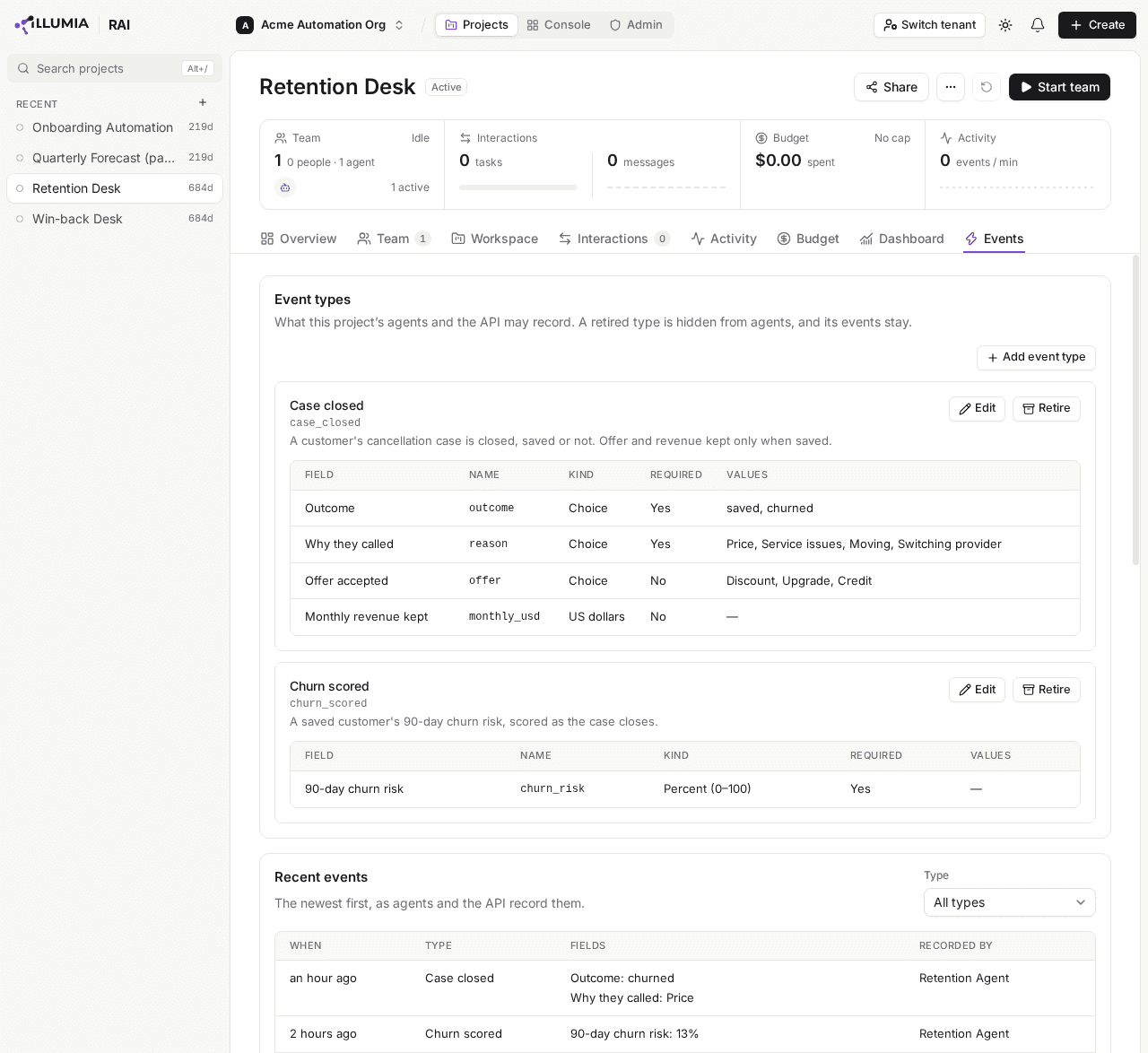
The Events tab lists the types the project declares, each with its fields, and the newest events recorded against them.
Declaring an event type
A project records only the event types it declares. Click Add event type on the Event types card to open New event type.
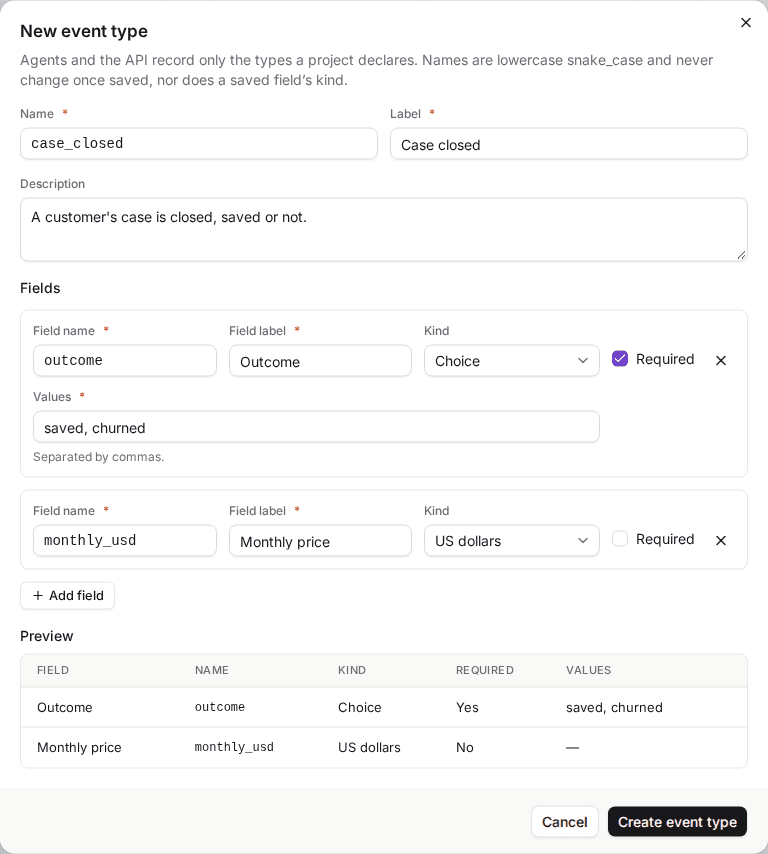
The Preview shows each field as the project's agents are told it.
Name the type. Name is how agents and the API refer to it: lowercase letters, digits and underscores, starting with a letter, such as case_closed. A name is never changed once saved, so choose it with care. Label is what the console shows, such as Case closed.
Say what it means. Description is what an agent is told the event means, so write it for them: A customer's case is closed, saved or not.
Add its fields. Click Add field for each value an event of this type carries, and give it a Field name (snake_case, as the type's name), a Field label, a Kind, and whether it is Required. A type with no field records only that something happened.
Create it. Click Create event type. Its card appears on the tab, and agents can record it from their next beat.
| Kind | Holds |
|---|---|
| Text | Text of up to 200 characters |
| Number | Any number |
| Count | A whole number, 0 or more |
| US dollars | An amount in US dollars |
| Percent (0–100) | A percent from 0 to 100 |
| Yes or no | Yes or no |
| Choice | One of the Values you list, separated by commas, such as saved, churned |
Editing a type
Click Edit on a type's card. You can change its label and description, add fields, change a field's label or whether it is required, and give a Choice more values. A type's name, a field's name and a field's kind never change, and a choice never loses a value, because the events already recorded, and the figures charted from them, rest on each. To record something else, add a field or a type under a new name.
Retiring a type
Click Retire on a type's card to stop it being recorded. Its agents no longer see it, the API refuses new events of it, and Add widget no longer offers it, while its events stay in the log and every chart already drawn from them keeps counting them. Restore brings it back. A type is never deleted: a project declares at most 20, retired ones included.
Who can declare them
Declaring, editing, retiring and restoring a type need Write access to the project. Anyone with Read access sees the types and their events, with Add event type, Edit and Retire disabled and a reason naming the Write access they need. On an Archived project they are disabled for everyone.
Recent events
The Recent events card lists the project's events, newest first by when they happened: When, the Type, its Fields as label and value, and Recorded by, which names the person, or the agent by its name on the team. Choose a type under Type to list only its events, and Load More at the end of the list to read older ones.
How agents record events
Once a project declares a type that is not retired, every agent on it can record events as it works, from its next beat. The agent is told each type's label, its description and its fields, with their kinds, their choices and which are required, and records an event when what it describes happens: when it closes a case, say. An event happens when the agent records it, and it can name one of its tasks as the event's task.
- An event costs no action and no tool call. It is apart from the agent's Max actions per beat and Max tool calls per beat, so a beat that spends all its actions still records what it achieved.
- Each agent has a cap of its own, Events per beat on its Heartbeat tab: 10 unless you change it, from 1 to 20. An event past the cap is not recorded, and the agent is told so.
- Autonomy does not hold events. An event records what the agent did, so an agent at Manual approval records its events while its actions wait for approval.
- An event is checked against its type. One naming a type the project does not declare, a field the type lacks, a value its kind does not hold, or no value for a required field is refused, and the agent is told why within the beat, so it can correct it.
- Text passes the guardrails that govern the agent's other output. One a guardrail blocks refuses its event, and one it rewrites is recorded as rewritten.
The agent's Logs tab says what each beat recorded, such as 3 actions · 2 events · event cap reached — 1 event not recorded, and the beat's transcript lists each event with its fields, and why one was not recorded.
Recording events through the API
People and other systems record events through the console's API, https://api.be.askrai.ai. A request carries a person's console sign-in as its bearer token: the token your identity provider issues when that person signs in to the console. There is no Programmable Access API key for these routes yet, so a script runs as a person, and stops working when that sign-in expires. Each event it records is recorded as that person's, under Recorded by. Recording needs Write access to the project, and reading Read: a write with Read alone is answered 403.
| Route | |
|---|---|
GET /api/v1/projects/{project_id}/event-types | The types the project declares, retired ones with their archived_at |
PUT /api/v1/projects/{project_id}/event-types/{name} | Adds the type of that name, or replaces it, and answers every type. "archived": true retires it, and a body without it restores a retired type, so send it again to edit one. With If-None-Match: * it only adds, and answers 409 for a name the project declares |
POST /api/v1/projects/{project_id}/events | Records 1 to 100 events, all or none |
GET /api/v1/projects/{project_id}/events | The project's events, newest first, a page at a time |
Declaring a type
PUT /api/v1/projects/{project_id}/event-types/case_closed
Authorization: Bearer {sign_in_token}
Content-Type: application/json{
"label": "Case closed",
"description": "A customer's case is closed, saved or not.",
"fields": [
{ "name": "outcome", "label": "Outcome", "kind": "choice", "values": ["saved", "churned"], "required": true },
{ "name": "monthly_usd", "label": "Monthly price", "kind": "usd" }
]
}A field's kind is text, number, count, usd, percent, bool or choice, and only a choice lists values. The body replaces the type whole, so a description left out is cleared. A replacement is held to the same rules as an edit in the console: removing a field, changing its kind or dropping a choice's value is refused with 422.
Recording events
POST /api/v1/projects/{project_id}/events
Authorization: Bearer {sign_in_token}
Content-Type: application/json{
"events": [
{ "type": "case_closed", "fields": { "outcome": "saved", "monthly_usd": 89.99 }, "dedupe_key": "crm-118" },
{ "type": "case_closed", "fields": { "outcome": "churned" }, "occurred_at": "2026-11-16T14:05:00Z", "dedupe_key": "crm-119" }
]
}The answer, 201, counts what was stored: {"recorded": 2, "duplicates": 0}.
occurred_atis when it happened, with its time zone (Zfor UTC), now when left out. It may be up to 90 days ago, and never ahead of now.dedupe_key, up to 200 characters, makes a retry safe: an event whose key the project's log already holds records nothing and counts underduplicates. Give each event a key of your own system's, such as its case id.- All or none. One event refused refuses the whole request with
422, naming the first by its place and why, such as Event 0: outcome is one of saved, churned. Each is checked as an agent's is, and a retired type takes no new event. 409answers a request on an Archived project, or one that would take the project's log past 1,000,000 events.404answers a project you cannot read.
Reading events
GET /api/v1/projects/{project_id}/events lists events newest first by occurred_at. type keeps one type's, since and until bound when they happened, and page_size takes 1 to 200, 50 by default. Each event carries its type, fields, occurred_at, recorded_at and source, which says whether an agent or a person recorded it. While more remain, page_info.next_cursor is set: pass it as cursor, with the same filters, for the next page.
Charting events
The project's Dashboard charts its events. In Edit layout, Add widget builds a card or a chart over one event type: a count, a sum, average, minimum or maximum of a number field, or a rate, the share of the events that meet a condition, such as the share of closed cases saved. It reads as one number, a series by day, week or month, or a breakdown by a text, yes-or-no or choice field. The Dashboard Assistant can chart the project's events too.
An event figure is computed whenever it is read, so it is always current, and under it a line says who reported what it counted:
| Line | The figure counted |
|---|---|
| Reported by agents | Events the project's agents recorded |
| Recorded by people | Events people recorded, through the API |
| Reported by agents and recorded by people | Both |
| Computed by RAI | Nothing from the log: AskRAI computed it from the project itself, such as its open tasks or its spend |
An event figure that counted no event shows no line. An open Dashboard or Overview tab follows the work: a chart of an event type moves within a few seconds of an event of that type being recorded, with no reload.
What becomes of events
Events stay for as long as the project does. A reset keeps them, so a dashboard keeps its history across runs, and deleting the project deletes them. A project holds at most 1,000,000 events: past that, nothing more is recorded, and its agents are told the log is full.
Limits
| At most | |
|---|---|
| Event types a project declares, retired ones included | 20 |
| Fields a type declares | 20 |
| Values a choice holds | 50 |
| A type's or field's name | 40 characters, snake_case |
| A label, or a choice's value | 80 characters |
| A type's description | 300 characters |
| A text field's value | 200 characters |
| Events an agent records in a beat | Its Events per beat, 1 to 20 |
| Events one API request records | 100 |
| Events a project holds | 1,000,000 |
Troubleshooting
| Symptom | Likely cause | Resolution |
|---|---|---|
| An agent never records events | The project declares no type, or only retired ones | Declare a type, or Restore one. Agents see it from their next beat |
| An agent's beat reads event cap reached — 1 event not recorded | It wanted to record more events than its Events per beat | Raise Events per beat on its Heartbeat tab |
| An event an agent recorded is missing | It was refused against its type, or by a guardrail, which its beat's transcript names | Read the beat's transcript on the agent's Logs tab, and correct the type's description or the agent's instructions |
| Add event type is disabled, and says the project declares at most 20 | The project declares 20 types, retired ones included | Record the new event as a field, or a choice value, of a type you have |
| Kind and Field name are disabled on a field | The field is saved, and its name and kind never change | Add a field under a new name |
POST /events answers 422 naming an event | That event fails its type's check, so none was recorded | Correct the event the message names and send them all again |
POST /events answers 401 | The request carries an API key, or a sign-in that has expired | Send a person's current console sign-in as the bearer token |
| An agent's beat reads 1 event refused, or 2 events · 1 refused | The event passed within the beat but was refused as the beat's work was saved: its type was retired meanwhile, say, or the log is full | Read why in the beat's transcript, under Events |
Related pages
- Dashboard — chart the project's events, and arrange its cards and charts
- Agent Heartbeat & Autonomy — set an agent's Events per beat beside its other per-beat limits
- Team — read what each beat recorded on an agent's Logs tab
- Assistants — ask the Dashboard Assistant for a dashboard of the project's events
Dashboard
Arrange a project's Dashboard tab of cards and charts — pin an assistant's dashboards to it, chart the project's events, follow the figures live, and write widgets through the API
Sharing & Access
Share a project with people, groups or everyone in your tenant at Read, Write or Admin, and see what each access level lets them see and do in it